The Metric State Diagram widget renders a state transition diagram that illustrates how the values of a metric change across distinct states over a given time period.
Instead of plotting the exact value of the metric like a chart, the diagram translates each value into a state (for example, below threshold, within range, or above threshold) and shows how long the Thing stayed in each of them.
This makes it easy to answer questions such as how often a machine worked outside its nominal operating range, at what time of the day a critical condition typically occurs, or whether an anomaly reported by the customer matches a recurring pattern.
Each state is defined by a condition on the metric value and is displayed with its own color, so a week of operation can be assessed at a glance.
Reading the diagram
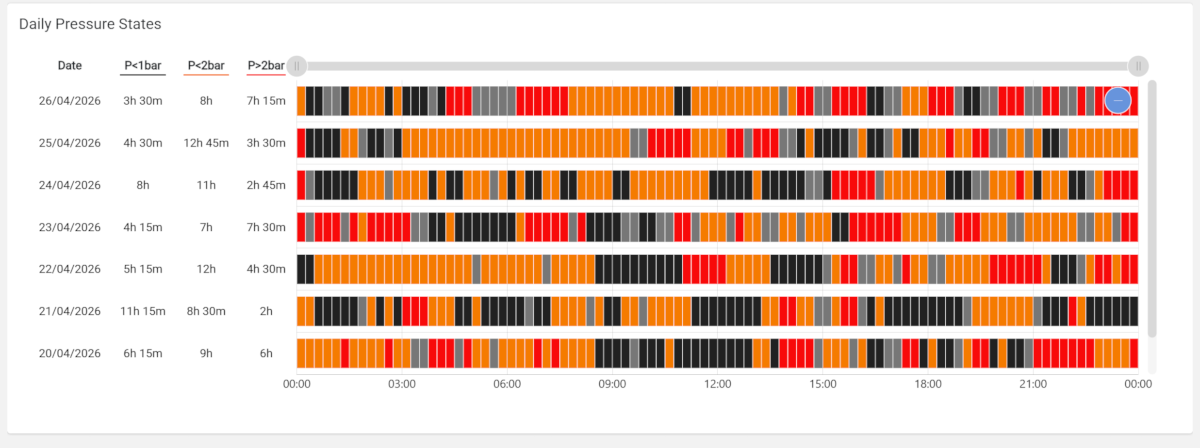
The diagram displays a row for each day of the selected period (last 7 days by default), and the area is subdivided into two vertically aligned tables:
Summary Table: Displays the
Dateof the day, together with a column for each Metric State and each Metric sub-element.
The metric state columns are highlighted in the same way as the state-related cells and give the daily totals behind the sequence, while the additional metrics provide the context needed to interpret it (e.g., the average temperature of that day).State Sequence: Displays how the states followed one another during the day, from midnight to midnight.
The State Sequence of each day can be continuous or aggregated (15 minutes or 1 hour). A continuous sequence reproduces the exact transitions as they were received, while an aggregated one divides the day into fixed time slots and evaluates a single value per slot, resulting in a more regular and readable diagram over long periods.
When Offline Enabled is selected, a gray cell or bar marks the intervals in which the Thing was offline, so that a gap in the data is not mistaken for a stable state.
Both the horizontal and vertical axes are scrollable, allowing you to view the graph on small screens even when a wide time range has been selected.
Widget Configuration
To configure the widget, you must:
Select the Metric you want to display.
Select the Timeframe,
Noneif you want a continuous sequence, otherwise,Minutes 15orHours 1for aggregated.
If discrete, you must also select the Aggregation function (e.g., Average).Add one or more Metric State sub-elements, and for each of them, configure:
Label: The text you want to display as the table header or in the state-cell tooltip.
Within the label, you can use the${value}placeholder, which is automatically replaced with the condition value, even if dynamic (see Value Reference).Predicate and Value: The condition you want to verify for each metric’s value.
Value Variable: You can specify a page variable (e.g., Number Field) to dynamically compute states, based on user inputs [optional].
If defined, but no input is provided, the value is used instead.Severity: The severity (one of Neutral, Success, Warning, Critical) used to highlight each state-cell.
State Bar Color: The optional color, whether you want to override the default one associated with the severity.
Add one or more Metric sub-elements that you want to display in the Summary Table.
Each Metric sub-element of the Summary Table can be aggregated independently (AVG, DELTA, MIN, MAX); if no aggregation is set, the last value of the day is displayed.
By default the widget loads the last 30 days, but optionally the widget can also be bound to a period selector or to a search field defined on the page (Period Reference, Event Query Reference), so that the context stays in sync with the other widgets of the same page.
In case a Timeframe has been selected (15 mins or 1 hour), each state-cell is highlighted according to the latest evaluated condition, so be careful to define Metric States in the right order, especially when using greater-than or less-than predicates.
Template Syntax
Below you can find some examples of how to use the component within a template.
<div class="d-flex flex-wrap components-row">
	<metric-state-diagram-widget [title]="'Pressure State'" metricName="pressure_out" timeframe="MINUTES_15" periodRef="period" [offlineEnabled]="true" class="flex-fill">
		<metric-state label="P<1bar" predicate="lt" value="1" severity="NEUTRAL"></metric-state>
		<metric-state label="P<${value}bar" predicate="le" value="2" severity="WARNING"></metric-state>
		<metric-state label="P>${value}bar" predicate="gt" value="2" severity="CRITICAL"></metric-state>
		<metric name="temp_out" label="Temp." filter="singleDecimalFormat" unit="°C" aggregation="AVG"></metric>
	</metric-state-diagram-widget>
</div>
Component Reference
Here is a comprehensive list of all the elements and properties that can be used to configure the component.
Metric State Diagram <metric-state-diagram-widget>
Aggregation | The aggregation function used to calculate the value of each status cell. Name: aggregation Type: AGGREGATION | Optional Functions: MIN, MAX, AVG, DELTA Default Value: AVG
|
Description | Name: description Type: STRING | Optional
|
Metric | The metric whose value(s) must be loaded by the widget. Name: metricName Type: METRIC | Required
|
Show Summary Table | Enable the summary table on the left side of the diagram. Name: showSummaryTable Type: BOOLEAN | Optional Default Value: true
|
Timeframe | The time interval used to divide the day fixed time slots. Name: timeframe Type: ENUM | Optional Values: NONE, MINUTES_15, HOURS_1 Default Value: NONE
|
Title | The title displayed on the top part of the widget box. Name: title Type: STRING | Optional
|
Value Filter | The filter used to transform metric values. Name: valueFilter Type: FILTER | Optional
|
Advanced | |
| The default status bar color. Name: stateBarColor Type: STRING | Optional
|
State Condition | |
| The condition predicate to be applied on metric values. Name: predicate Type: ENUM | Optional Values: lt, le, eq, ne, ge, gt, in
|
| The comparison value of the state condition. Name: value Type: STRING | Optional
|
Data | |
Default Loading Period | The default filtering period applied when entering the page. Name: defaultLoadingPeriod Type: PERIODS | Optional Default Value: LAST_7_DAYS
|
Offline Enabled | If selected, a gray cell or bar appears to indicate that the thing was offline. Name: offlineEnabled Type: BOOLEAN | Optional Default Value: false
|
Period Variable | The id of the page's variable providing the date range filtering period, for instance the id of a . Name: periodRef Type: STRING | Optional
|
Rendering | |
Availability | Configure availability based on active features on Digital Plan on Add-ons Name: hasFeature Type: FEATURE (multiple) | Optional
|
CSS Class | The name(s) of the CSS class used to customize the widget layout. Name: class Type: STRING | Optional
|
Visibility Condition | The expression that allows you to reduce the visibility of the element. Name: *ngIf Type: STRING | Optional
|
Sub Elements | |
The metrics displayed in the details section of the selected day. | |
A specific state to highlight for the metric. | |
Metric <metric>
Aggregation | The aggregation to be applied to the daily values of the metric. If missing, the last value of the day is loaded. Name: aggregation Type: ENUM | Optional Values: AVG, DELTA, MIN, MAX
|
Filter | The name of the filter used to transform and display values. Name: filter Type: FILTER | Optional
|
Label | The metric alternative label. Name: label Type: STRING | Optional
|
Name | The additional metric whose aggregated value should be displayed in the summary table. Name: name Type: METRIC | Required
|
Unit | The unit of measurement to be displayed along the value. Name: unit Type: STRING | Optional
|
Advanced | |
Visibility Condition | The expression that allows you to reduce the visibility of the element. Name: *ngIf Type: STRING | Optional
|
Metric State <metric-state>
Label | The label describing the state in the diagram. Name: label Type: STRING | Required
|
Predicate | The condition predicate to be applied to metric values. Name: predicate Type: ENUM | Required Values: lt, le, eq, ne, ge, gt, in
|
Severity | The severity of the state. Name: severity Type: ENUM | Required Values: NEUTRAL, SUCCESS, WARNING, CRITICAL
|
State Bar Color | The alternative hexadecimal color for the state. Name: stateBarColor Type: STRING | Optional
|
Value | The comparison value for checking the state. Name: value Type: STRING | Required
|
Value Variable | The id of the page's variable providing the dynamic value used to compute metric states, for instance the id of a . Name: valueRef Type: STRING | Optional
|
Full Syntax Example
<metric-state-diagram-widget
[title]="'Metric State Diagram'"
description="abc"
metricName="metricName"
valueFilter="dateFormat"
timeframe="NONE"
aggregation="DELTA"
[showSummaryTable]="false"
stateBarColor="#007BFF"
predicate="lt"
value="abc"
periodRef="abc"
defaultLoadingPeriod="LAST_30_DAYS"
[offlineEnabled]="true"
class="abc"
*ngIf="getUser().organizationId != null"
hasFeature="['feature_a', 'feature_b']">
<metric
name="metricName"
label="Temperature"
filter="fooBarFilter"
unit="°C"
aggregation="AVG"
*ngIf="getUser().organizationId != null"></metric>
<metric-state
label="abc"
predicate="lt"
value="abc"
valueRef="abc"
severity="NEUTRAL"
stateBarColor="#007BFF"></metric-state>
</metric-state-diagram-widget>