Activates a pre-registered product by entering the serial number.
Within a page, this widget is rendered as a button, which the user can click to activate a new product.
When clicked, the page changes into a wizard that asks the user to provide the serial number of the product being activated.
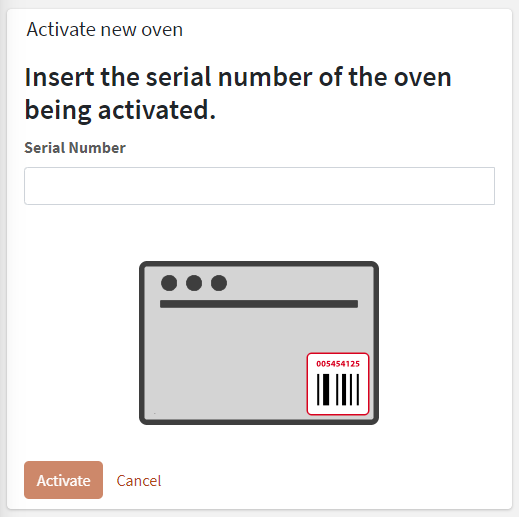
Optionally, a Connection Token may be asked for, but this depends on how you have pre-registered the products. For more details, refer to the Products Lifecycle article.
This widget must be placed into the location details template, or optionally into the overview template of the customer; in the last case, the user also has to select a location, if more than one is present, where to activate the new product.
When the activation completes, the user is redirected to the new product dashboard.
Template Syntax
Below you can find some examples of how to use the component within a template.
            <div class="d-flex flex-wrap components-row">
            <activate-thing-widget></activate-thing-widget>
            </div>
Component Reference
Here is a comprehensive list of all the elements and properties that can be used to configure the component.
Activate Thing <activate-thing-widget>
Rendering | |
Availability | Configure availability based on active features on Digital Plan on Add-ons Name: hasFeature Type: FEATURE (multiple) | Optional
|
CSS Class | The name(s) of the CSS class used to customize the widget layout. Name: class Type: STRING | Optional
|
Visibility Condition | The expression that allows you to reduce the visibility of the element. Name: *ngIf Type: STRING | Optional
|
Advanced | |
Scanned serial transformer | Filter used to extract the serial number from the scanned value. Name: serialNumberScannedValueTransformer Type: FILTER | Optional
|
Scanned token transformer | Filter used to extract the connection token from the scanned value. Name: connectionTokenScannedValueTransformer Type: FILTER | Optional
|
Full Syntax Example
<activate-thing-widget
    class="my-custom-class"
    *ngIf="getUser().organizationId != null"
    hasFeature="['feature_a', 'feature_b']"
    serialNumberScannedValueTransformer="dateFormat"
    connectionTokenScannedValueTransformer="dateFormat">
</activate-thing-widget>