This component provides the templates you can use to configure the Data Recipient view.
Customer List
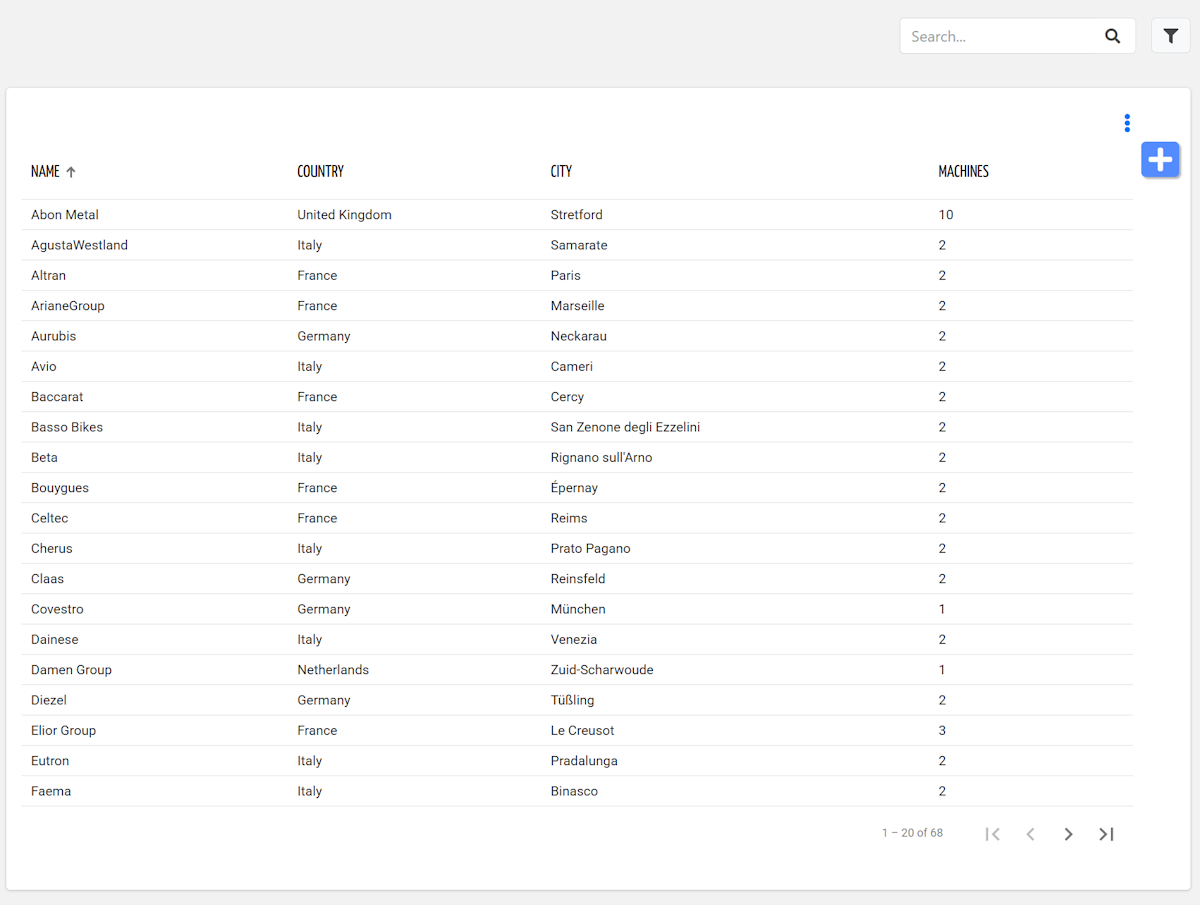
This template shows the list of customers visible to a Data Recipient.
It can be used in a general-purpose page, either as a standalone page or as a fragment combined with other templates.
Template name | customer_list_data_recipient |
Usage | General Page |
Target users | Any |
For each customer, the list displays:
Name: the name of the customer.
Country: the country of the customer.
Things: the number of things.
The list can be sorted and filtered.
<div class="d-flex flex-wrap components-row justify-content-end">
	<search-field id="query" label="Filter Customers" searchTarget="CUSTOMERS" class="pull-right mb-2"></search-field>
</div>
<div class="d-flex flex-wrap components-row">
	<customer-list-widget-v2 class="flex-fill" [pageSize]="20" queryFieldRef="query">
		<property name="name"></property>
		<property name="country"></property>
		<property name="properties.thingCount" label="Things"></property>
	</customer-list-widget-v2>
</div>
Thing List
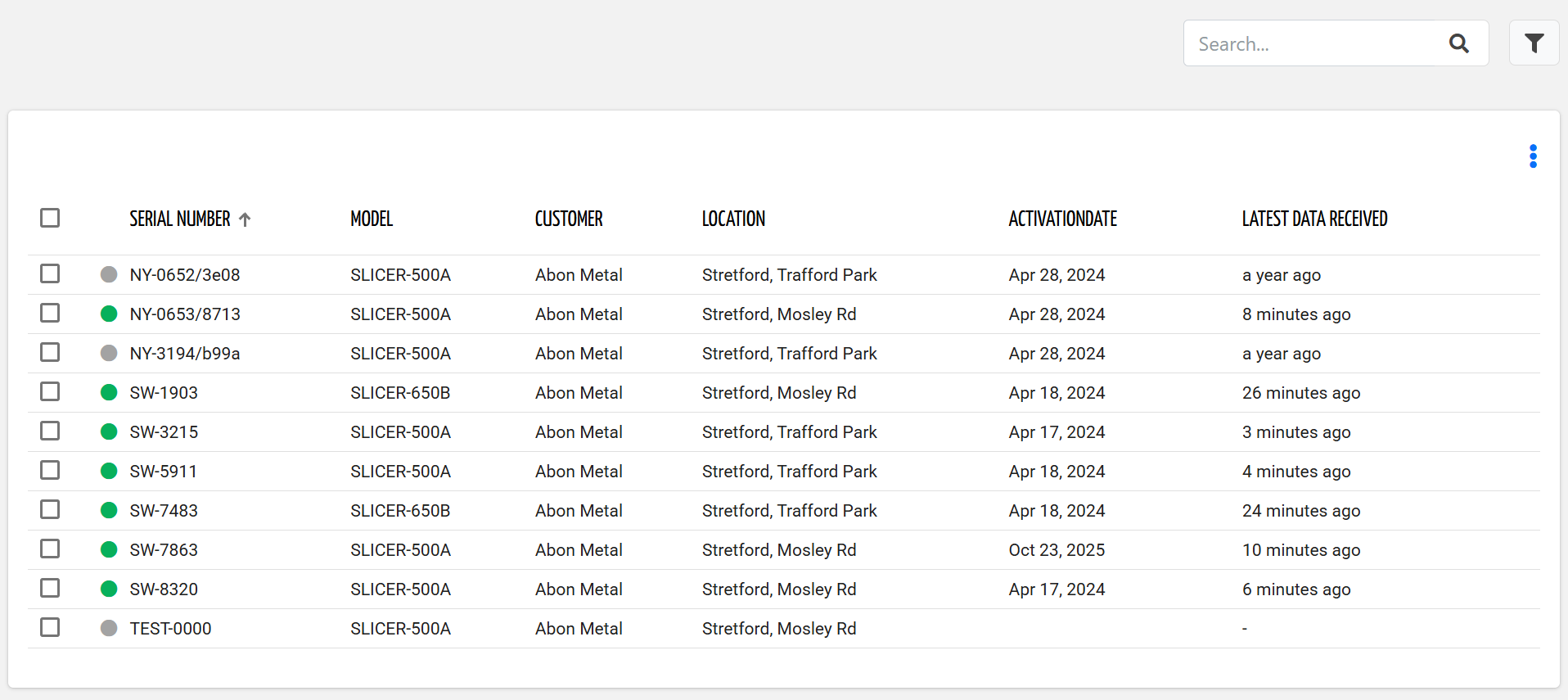
This template shows the list of things visible to a Data Recipient.
It can be used in a general-purpose page, either as a standalone page or as a fragment combined with other templates.
Template name | thing_list_data_recipient |
Usage | General Page |
Target users | Data Recipient |
For each thing, the list displays:
Serial Number: the serial number of the connected thing.
Model: the name of the Product Model associated with the thing.
Customer: the name of the Customer owning the thing.
Location: the name of the Location where the thing is installed.
Last Data Received: the relative time the thing published the last message.
The list can be sorted and filtered.
<div class="d-flex flex-wrap components-row justify-content-end">
	<search-field id="query" label="Filter Machines" class="pull-right mb-2"></search-field>
</div>
<div class="d-flex flex-wrap components-row">
	<thing-list-widget-v2 [enableActions]="false" [blockColumns]="2" [pageSize]="20" queryFieldRef="query" class="flex-fill" detailsMode="NONE">
		<property name="serialNumber"></property>
		<property name="productModel.name" label="Model"></property>
		<property name="customer.name" label="Customer"></property>
		<property name="location.name" label="Location"></property>
		<property name="latestMetricValueTimestamp" label="Latest Data Received" filter="millisToRelativePeriod"></property>
		<property name="subscriptionInfo.plan" label="Plan" filter="digitalPlan"></property>
	</thing-list-widget-v2>
</div>
Customer Details
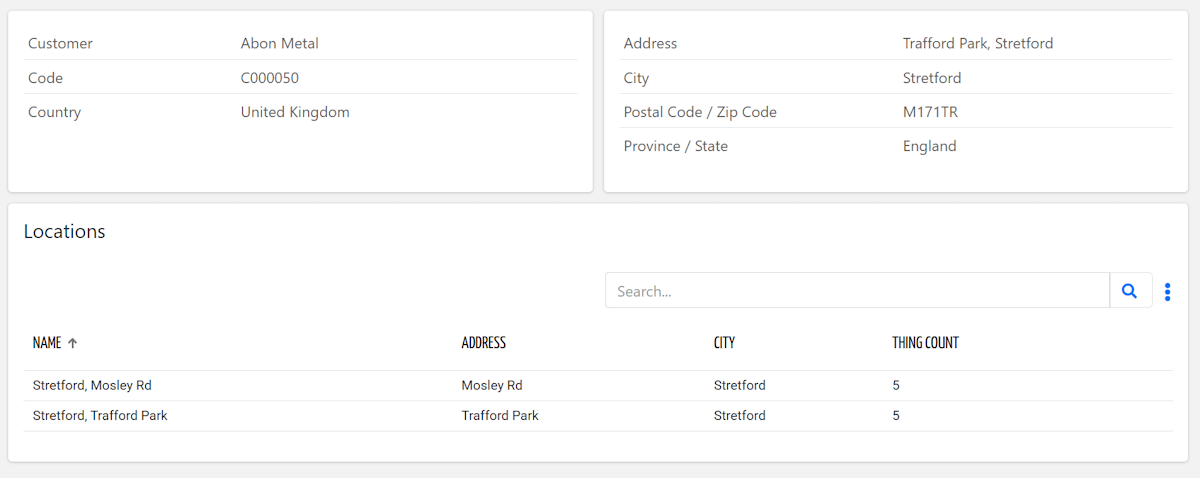
This template shows the customer details relevant to a Data Recipient.
It can be used in a general-purpose page, either as a standalone page or as a fragment combined with other templates.
Template name | customer_details_data_recipient |
Usage | General Page |
Target users | Data Recipient |
<div class="d-flex flex-wrap components-row">
	<customer-details-widget class="flex-fill">
		<property name="name" label="Customer"></property>
		<property name="code"></property>
		<property name="country"></property>
	</customer-details-widget>
</div>
<div class="d-flex flex-wrap components-row">
	<location-list-widget-v2 class="flex-fill" [title]="'Locations'">
		<property name="name"></property>
		<property name="properties.address" label="Address"></property>
		<property name="properties.city" label="City"></property>
		<property name="properties.thingCount" label="Thing Count"></property>
	</location-list-widget-v2>
</div>
Location Details
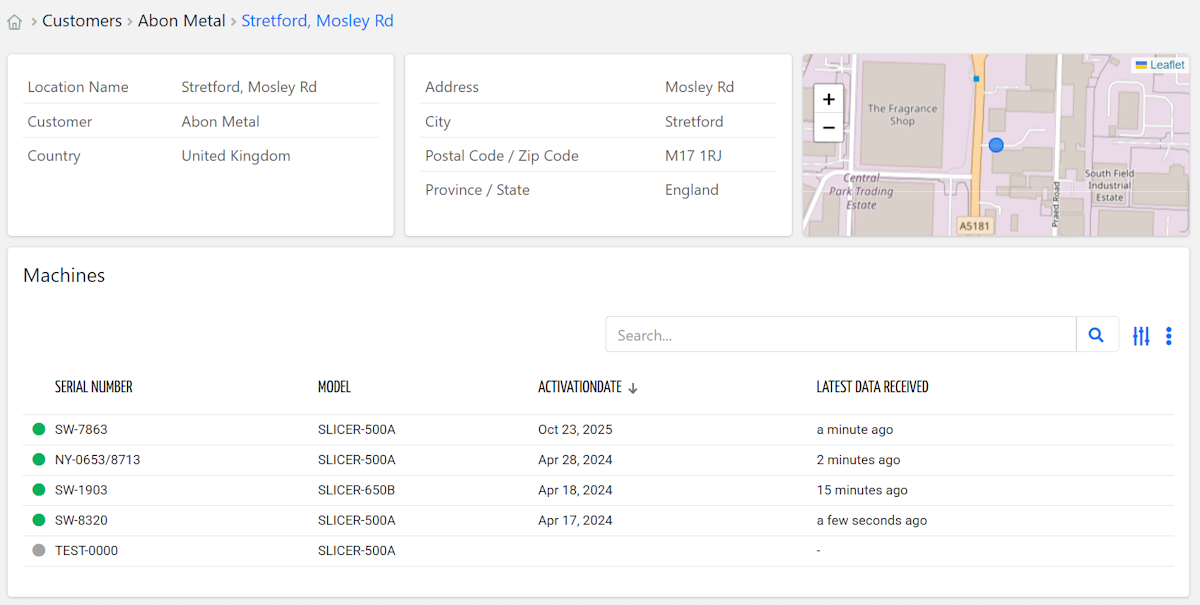
This template shows the location details relevant to a Data Recipient.
It can be used in a general-purpose page, either as a standalone page or as a fragment combined with other templates.
Template name | location_details_data_recipient |
Usage | General Page |
Target users | Data Recipient |
<div class="d-flex flex-wrap components-row">
	<location-details-widget class="flex-fill">
		<property name="name" label="Location Name"></property>
		<property name="customer.name" label="Customer"></property>
		<property name="country"></property>
	</location-details-widget>
	<location-details-widget class="flex-fill">
		<property name="properties.address"></property>
		<property name="properties.city"></property>
		<property name="properties.zipCode"></property>
		<property name="properties.province"></property>
	</location-details-widget>
	<location-details-widget class="map-box flex-fill">
		<property name="gpsPosition" filter="mapMarkerSmall"></property>
	</location-details-widget>
</div>
<div class="d-flex flex-wrap components-row">
	<thing-list-widget-v2 [title]="'Things'" [sort]="['activationDate','desc']" class="flex-fill" detailsMode="NONE">
		<property name="serialNumber"></property>
		<property name="productModel.name" label="Model"></property>
		<property name="latestMetricValueTimestamp" label="Latest Data Received" filter="millisToRelativePeriod"></property>
	</thing-list-widget-v2>
</div>
Data Recipient List
This template shows the list of Data Recipients registered in the DPS.
It can be used in a general-purpose page, either as a standalone page or as a fragment combined with other templates.
Template name | data_recipient_list |
Usage | General Page |
Target users | Organization Back-office |
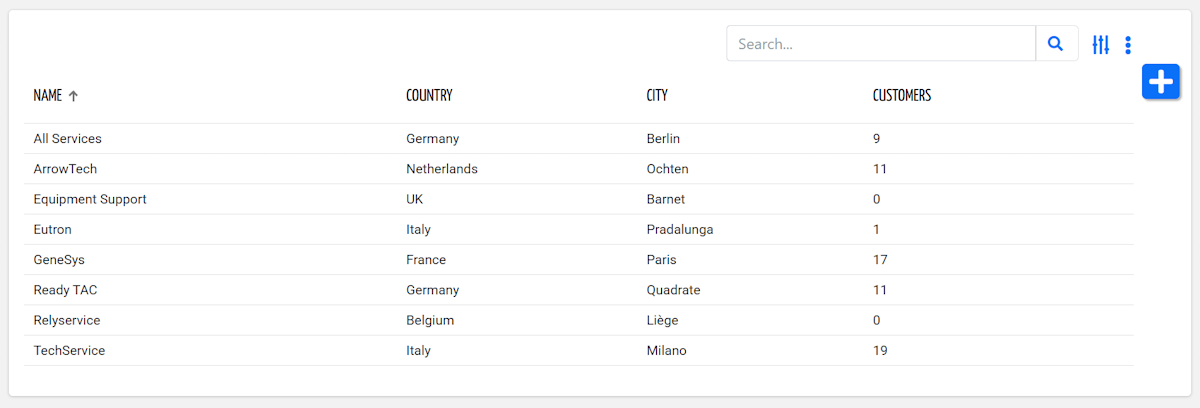
<div class="d-flex flex-wrap components-row">
	<partner-list-widget-v2 type="DATA_RECIPIENT" class="flex-fill">
	    <property name="name"></property>
		<property name="country"></property>
		<property name="properties.city"></property>
		<property name="properties.customerCount"></property>
	</partner-list-widget-v2>
</div>
Thing Details
This template shows key information about a thing, and allows the Data Recipient to export data.
It can be used within the detail view of a thing, either as a full page or as a reusable fragment embedded alongside other content.
Template name | thing_details_data_recipient |
Usage | Thing Details Page |
Target users | Data Recipient |
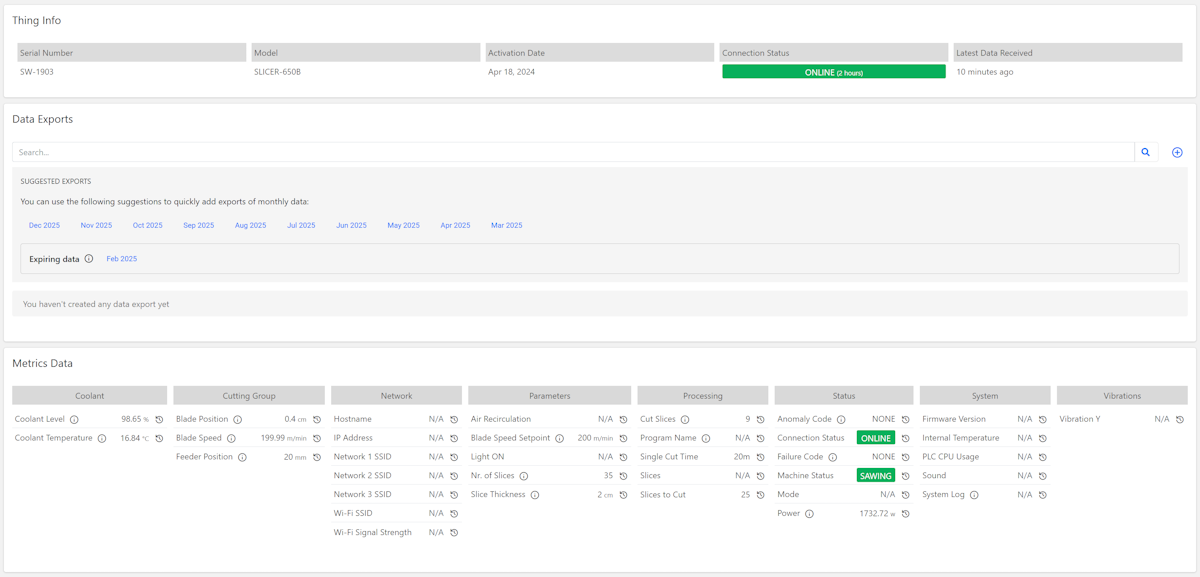
<div class="d-flex flex-wrap components-row">
	<thing-details-widget [title]="'Thing Info'" [columns]="3" layout="ALTERNATE_ROWS" class="flex-fill">
		<property name="serialNumber"></property>
		<property name="productModel.name"></property>
		<property name="latestMetricValueTimestamp" label="Latest Data Received" filter="millisToRelativePeriod"></property>
	</thing-details-widget>
</div>
<div class="d-flex flex-wrap components-row">
	<data-export-widget class="flex-fill"></data-export-widget>
</div>