This component provides the overview templates for various users.
Overview
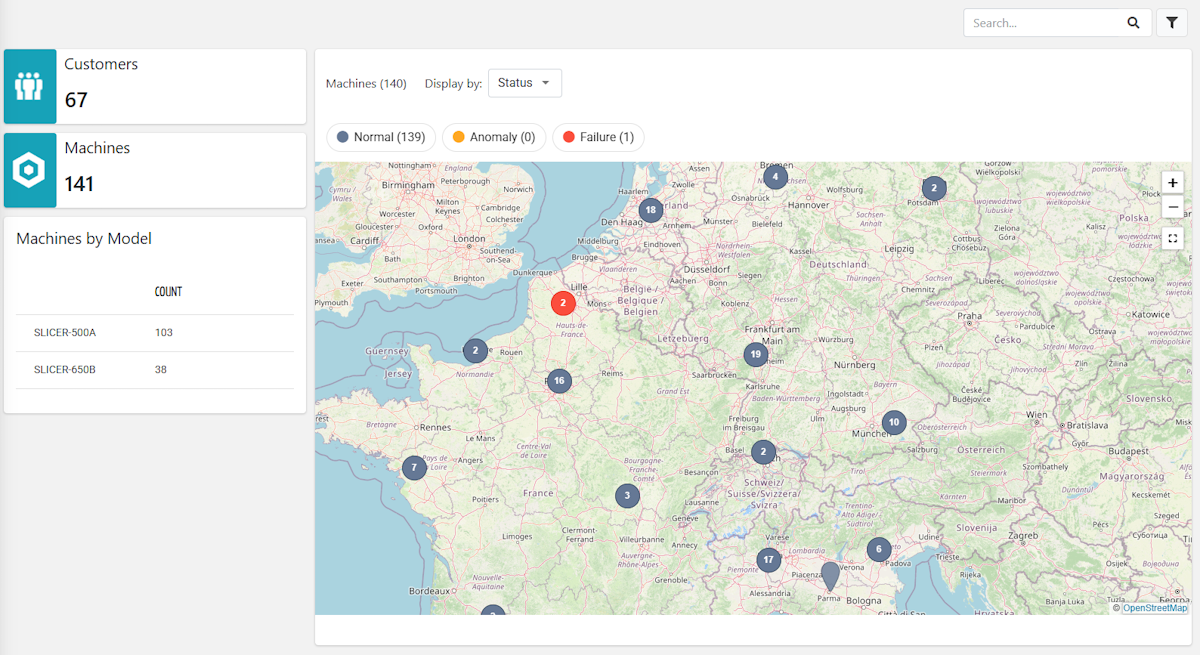
The organization overview that displays a map with machines highlighted according to status.
It can be used in a general-purpose page, either as a standalone page or as a fragment combined with other templates.
Template name | overview_organization |
Usage | General Page |
Target users | Any |
<div class="d-flex justify-content-end">
	<search-field id="query" label="Filter Machines"></search-field>
</div>
<div class="d-flex flex-wrap components-row">
	<div class="d-flex flex-column components-column">
		<gauge-widget [title]="'Customers'" iconUrl="https://resources.servitly.com/resources/icons/customers.png" layout="INFO_BOX" queryFieldRef="query">
			<statistic resource="CUSTOMER" aggregation="COUNT"></statistic>
		</gauge-widget>
		<gauge-widget [title]="'Machines'" iconUrl="https://resources.servitly.com/resources/icons/thing.png" layout="INFO_BOX" queryFieldRef="query">
			<statistic resource="THING" aggregation="COUNT"></statistic>
		</gauge-widget>
		<table-widget [title]="'Machines by Model'" queryFieldRef="query">
			<statistic resource="THING" aggregation="COUNT" [groupBy]="['productModel.name']"></statistic>
		</table-widget>
	</div>
	<div class="d-flex flex-column components-column flex-fill">
		<map-widget queryFieldRef="query" refreshInterval="15000" class="flex-fill">
			<map-filter name="ConnectionStatusMapFilter"></map-filter>
			<map-filter name="StatusMapFilter"></map-filter>
			<property name="serialNumber" label="Serial Number"></property>
			<property name="productModel.name" label="Model"></property>
			<property name="customer.name" label="Customer"></property>
			<property name="location.name" label="Location"></property>
			<composite-part label="Connection Status" filter="connectionStatus">
				<property name="connectionStatus"></property>
				<property name="connectionStatusLastUpdateTimestamp"></property>
			</composite-part>
			<property name="properties.status" label="Status" filter="statusBadge"></property>
		</map-widget>
	</div>
</div>
Overview
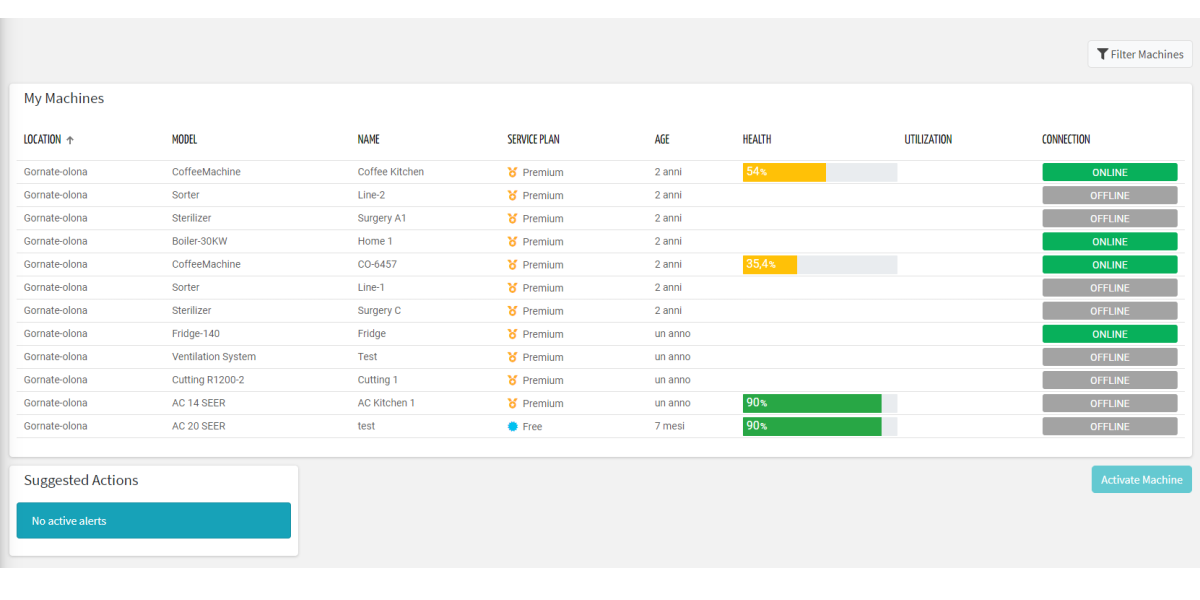
The customer overview that displays the list of machines and relevant actions.
It can be used in a general-purpose page, either as a standalone page or as a fragment combined with other templates.
Template name | overview_customer |
Usage | General Page |
Target users | Any |
<div class="d-flex flex-wrap components-row justify-content-end">
   <search-field id="query" label="Filter Machines"></search-field>
</div>
<div class="d-flex flex-wrap components-row justify-content-start">
   <thing-grid-widget template="thing_card_details" [hideWhenEmpty]="true" class="no-border flex-fill"></thing-grid-widget>
</div>
<div class="d-flex flex-wrap components-row">
   <thing-list-widget-v2 [title]="'Things'" queryFieldRef="query" class="flex-fill">
      <property name="location.name" label="Location"></property>
      <property name="thingDefinition.name" label="Model"></property>
      <property name="name"></property>
      <property name="serviceLevel" filter="serviceLevel"></property>
      <property name="activationDate" label="Age" filter="millisToRelativePeriodNoSuffix"></property>
      <property name="connectionStatus" label="Connection" filter="connectionStatus"></property>
   </thing-list-widget-v2>
</div>
<div class="d-flex flex-wrap components-row justify-content-start">
   <action-list-widget [title]="'Actions'" [status]="['TODO']" emptyMessage="No action to do" class="flex-fill"></action-list-widget>
</div>
<div class="d-flex flex-wrap components-row">
   <activate-thing-widget class="{{isMobile() ? 'w-100' : 'align-self-start'}}"></activate-thing-widget>
</div>
Overview 2
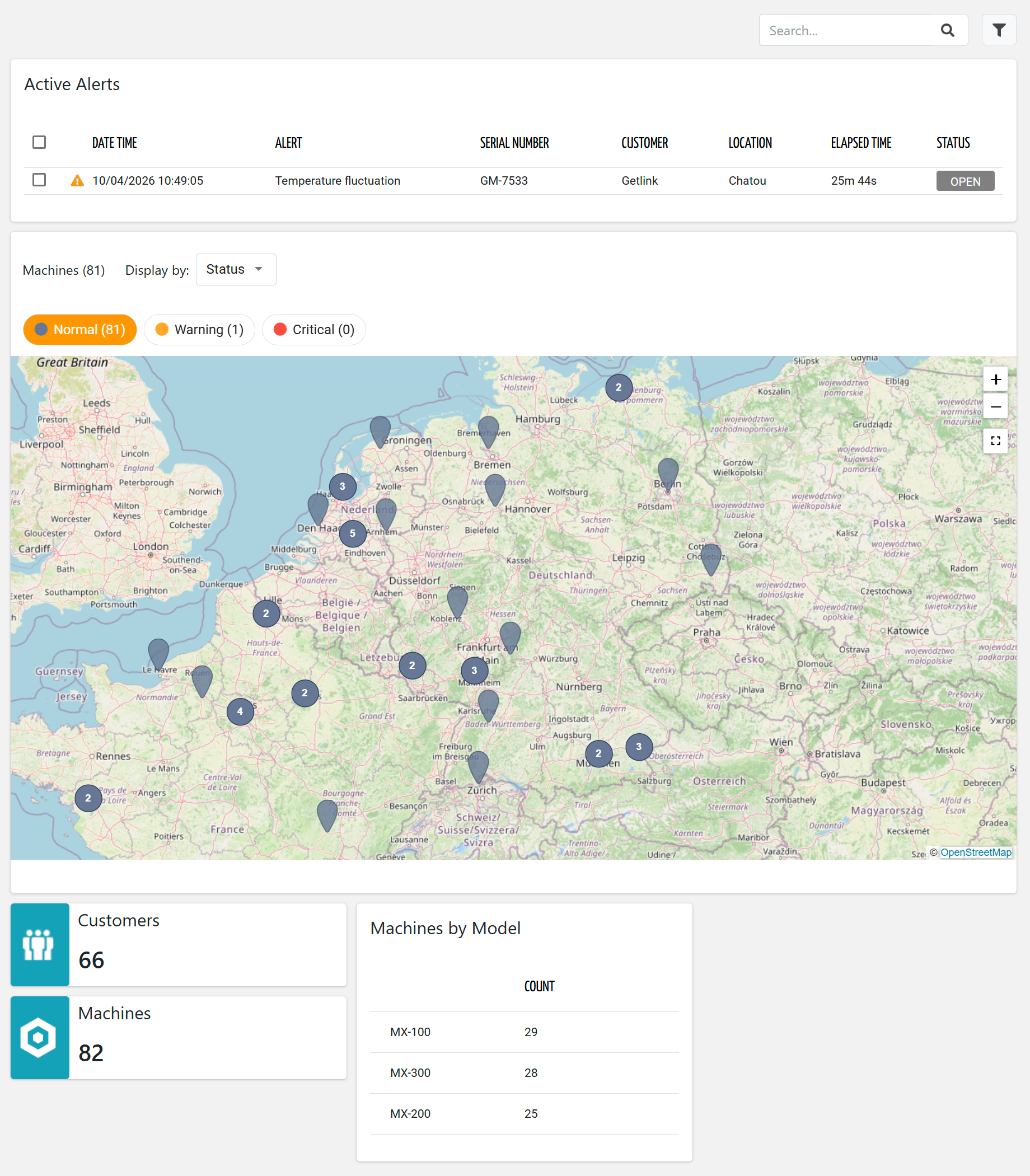
The organization overview that displays a map with machines highlighted according to status.
It can be used in a general-purpose page, either as a standalone page or as a fragment combined with other templates.
Template name | overview_organization_2 |
Usage | General Page |
Target users | Any |
<div class="d-flex justify-content-end">
	<search-field id="query" label="Filter Machines"></search-field>
</div>
<div class="d-flex flex-wrap components-row">
	<active-alert-list-widget-v2 [title]="'Active Alerts'" [exportEnabled]="false" [controlsEnabled]="false" [enableActions]="false" [sort]="['thing.serialNumber','asc']" queryFieldRef="query" [pageSize]="20" class="flex-fill">
		<property name="severity" [showHeader]="false" columnClass="align-content-center column-size-hug"></property>
		<property name="date" label="Date Time"></property>
		<property name="title" label="Alert"></property>
		<property name="thing.serialNumber"></property>
		<property name="customer.name" label="Customer" *ngIf="getUser()?.organizationId"></property>
		<property name="location.name" label="Location"></property>
		<property name="duration" label="Elapsed Time"></property>
		<composite-part label="Status" filter="alertStatus">
			<property name="acknowledgedTime"></property>
		</composite-part>
	</active-alert-list-widget-v2>
</div>
<div class="d-flex flex-wrap components-row">
	<map-widget queryFieldRef="query" refreshInterval="30000" class="flex-fill">
		<map-filter name="ConnectionStatusMapFilter"></map-filter>
		<map-filter name="StatusMapFilter:{'preselectedStates':['NORMAL','ANOMALY']}"></map-filter>
		<property name="serialNumber" label="Serial Number"></property>
		<property name="productModel.name" label="Model"></property>
		<property name="customer.name" label="Customer"></property>
		<property name="location.name" label="Location"></property>
		<property name="properties.connected_machine" label="Connected Machine" filter="yesNo"></property>
		<composite-part label="Connection Status" filter="connectionStatus">
			<property name="connectionStatus"></property>
			<property name="connectionStatusLastUpdateTimestamp"></property>
		</composite-part>
		<property name="properties.status" label="Status" filter="statusBadge"></property>
	</map-widget>
</div>
<div class="d-flex flex-wrap components-row">
	<div class="d-flex flex-column components-column">
		<gauge-widget [title]="'Customers'" iconUrl="https://resources.servitly.com/resources/icons/customers.png" layout="INFO_BOX" queryFieldRef="query">
			<statistic resource="CUSTOMER" aggregation="COUNT"></statistic>
		</gauge-widget>
		<gauge-widget [title]="'Machines'" iconUrl="https://resources.servitly.com/resources/icons/thing.png" layout="INFO_BOX" queryFieldRef="query">
			<statistic resource="THING" aggregation="COUNT"></statistic>
		</gauge-widget>
	</div>
	<div class="d-flex flex-column components-column">
		<table-widget [title]="'Machines by Model'" queryFieldRef="query">
			<statistic resource="THING" aggregation="COUNT" [groupBy]="['productModel.name']"></statistic>
		</table-widget>
	</div>
</div>