Displays a daily grid summarizing the events that occurred and the corresponding metric updates.
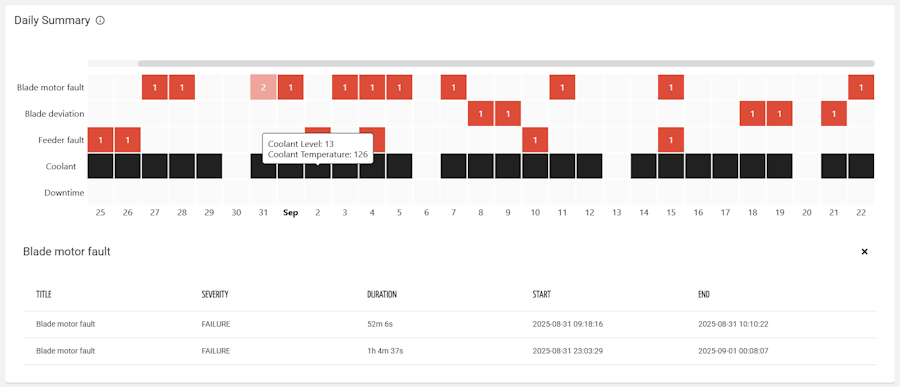
Reading the diagram
The X axis represents the days of the selected period, while each row on the Y axis is an event or a metric. A marked cell means that something relevant happened on that day: an event occurred, a metric value was changed, or a metric entered a warning or critical status.
Reading the grid horizontally shows how a single event or metric behaved over time; reading it vertically shows everything that happened on a given day, making it easy to correlate a failure with the setting changes or the abnormal readings that preceded it.
Event rows
Only the events with at least one occurrence in the selected period are displayed, so the grid stays compact regardless of how many events are defined on the Thing Definition.
The events to display can be selected by name (Event Names) or filtered through a query on their properties (Event Query).
Two options enrich each cell:
Show Event Count displays the number of daily occurrences, useful to distinguish an isolated event from a recurring one.
Show Event Severity colors the cell according to the severity of the event.
With Sort By Occurrences, the most frequent events are moved to the top of the grid; otherwise, rows are sorted by name.
Metric rows
Each metric declared within the widget adds a row to the grid.
Metrics sharing the same Group are collapsed into a single row, so related values, for example, all the temperature setpoints, can be tracked together.
The Highlight option defines what the widget considers relevant for each metric:
VALUE_CHANGE highlights the days on which the value was modified (typical for settings and configuration parameters).
VALUE_SEVERITY highlights the days on which the value entered the WARNING or CRITICAL status (typical for measures with configured thresholds).
Show Metric Highlight Count displays the number of daily highlights within each cell.
Period and page context
By default the grid loads the last 30 days, but optionally the widget can also be bound to a period selector or to a search field defined on the page (Period Reference, Event Query Reference), so that the context stays in sync with the other widgets of the same page.
Template Syntax
Below you can find some examples of how to use the component within a template.
<daily-summary-grid-widget [title]="'Daily Summary'" class="flex-fill" [config]="{showEventCount: true, showEventSeverity: true, sortByOccurrences: true, eventNames: 'E20,E21,E22'}">
        <metric name="downtime_time" [config]="{highlight: 'VALUE_SEVERITY'}"></metric>
        <metric name="coolant_level"></metric>
        <metric name="coolant_temperature" [config]="{highlight: 'VALUE_SEVERITY'}"></metric>
</daily-summary-grid-widget>
Component Reference
Here is a comprehensive list of all the elements and properties that can be used to configure the component.
Daily Summary Grid <daily-summary-grid-widget>
Description | The description of the widget. Name: description Type: STRING | Optional
|
Title | The title displayed on the top part of the widget box. Name: title Type: STRING | Optional
|
Data | |
Default Loading Period | The default filtering period applied when entering the page. Name: config.defaultPeriod Type: PERIODS | Optional Default Value: LAST_30_DAYS
|
Period Reference | The ID of the page period field. Name: inputs.periodRef Type: STRING | Optional
|
Events | |
Event Names | The exact names of the events to display on the Y axis. If there are no occurrences for a given event, it will be discarded. Name: config.eventNames Type: STRING | Optional
|
Event Query | The query used to filter events. Name: config.eventQuery Type: QUERY | Optional Predicates: beginsWith, eq, neq, gt, gte, isEmpty, isNotEmpty, lt, lte, like, notLike
|
Event Query Reference | The ID of the page's <search-field> used to filter events. Name: inputs.eventQueryRef Type: STRING | Optional
|
Show Event Count | The number of daily events is displayed in each cell of the grid. Name: config.showEventCount Type: BOOLEAN | Optional Default Value: false
|
Show Event Severity | The cell related to an event is colored according to the event severity. Name: config.showEventSeverity Type: BOOLEAN | Optional Default Value: false
|
Sort By Occurrences | If selected, events are sorted by frequency (in descending order), otherwise, by name (in ascending order). Name: config.sortByOccurrences Type: BOOLEAN | Optional Default Value: false
|
Metrics | |
Metric Group Names | The exact names of the metric groups to display on the Y axis. Name: config.metricGroupNames Type: STRING | Optional
|
Show Changes Only | If selected, it highlights the cell only when the metric's status changes; otherwise, its status is propagated to the subsequent cells until it changes. Name: config.showChangesOnly Type: BOOLEAN | Optional Default Value: false
|
Show Metric Highlight Count | The number of daily metric highlights is displayed in each cell of the grid. Name: config.showMetricHighlightCount Type: BOOLEAN | Optional Default Value: false
|
Rendering | |
Availability | Configure availability based on active features on Digital Plan on Add-ons Name: hasFeature Type: FEATURE (multiple) | Optional
|
CSS Class | The name(s) of the CSS class used to customize the widget layout. Name: class Type: STRING | Optional
|
Visibility Condition | The expression that allows you to reduce the visibility of the element. Name: *ngIf Type: STRING | Optional
|
Sub Elements | |
The metric whose current value must be displayed within the widget. | |
Metric <metric>
Filter | The name of the filter used to transform and display values. Name: filter Type: FILTER | Optional
|
Name | The metric whose value(s) must be loaded by the widget. Name: name Type: METRIC | Required
|
Unit | The unit of measurement to be displayed along the value. Name: unit Type: STRING | Optional
|
Display Options | |
Group | The name used to group similar metrics together. The widget will display a row for each group or metric without a group. Name: config.group Type: STRING | Optional
|
Highlight | Define what the widget should display for the metric. You can choose whether to highlight each time the metric value is changed (e.g. settings) or whether to highlight when the metric value is in WARNING or CRITICAL status. Name: config.highlight Type: ENUM | Optional Values: VALUE_CHANGE, VALUE_SEVERITY Default Value: VALUE_CHANGE
|
Full Syntax Example
<daily-summary-grid-widget
    [title]="'Daily Summary Grid'"
    description="abc"
    [config]="{
        showEventCount: true,
        eventQuery: [{property:'prop1', predicate: 'eq', value: 'foo'}, {property:'prop2', predicate: 'in', value: ['bar', 'baz']}],
        eventNames: 'abc',
        defaultPeriod: 'LAST_30_DAYS',
        showEventSeverity: true,
        showMetricHighlightCount: true,
        sortByOccurrences: true,
        metricGroupNames: 'abc',
        showChangesOnly: true
    }"
    [inputs]="{
        eventQueryRef: 'abc',
        periodRef: 'abc'
    }"
    class="abc"
    *ngIf="abc"
    hasFeature="['feature_a', 'feature_b']">
    <metric
            name="metricName"
            filter="dateFormat"
            unit="abc"
            [config]="{
                group: 'abc',
                highlight: 'VALUE_CHANGE'
            }"></metric>
</daily-summary-grid-widget>