---
title: "Yamazumi Diagram"
slug: "yamazumi-diagram-widget"
updated: 2026-04-17T07:47:46Z
published: 2026-04-17T07:47:46Z
canonical: "learn.servitly.com/yamazumi-diagram-widget"
---
> ## Documentation Index
> Fetch the complete documentation index at: https://learn.servitly.com/llms.txt
> Use this file to discover all available pages before exploring further.
# Yamazumi Diagram
This widget prints out the value transitions of a metric considering the previous 7 days.
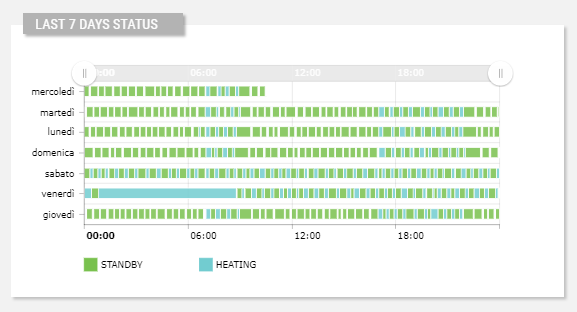
## Template Syntax
Below you can find some examples of how to use the component within a template.
```xml
```
## Component Reference
Here is a comprehensive list of all the elements and properties that can be used to configure the component.
#### Yamazumi Diagram `<yamazumi-chart>`
| *Color Filter* | The filter function used to draw values using a common color palette. **Name**: colorFilter **Type**: FILTER \| Optional `colorFilter="myColorFilter"` |
| --- | --- |
| *Colors* | The color palette used by the widget (e.g. ['#00a659', '#d3d3d3']) **Name**: colors **Type**: JSON \| Optional `[colors]="{p1: true, p2: 123, p3: 'abc'}"` |
| *Column Width* | The size (from 0 to 1) of the segments within the widget (e.g. 0.5). **Name**: columnWidth **Type**: FLOAT \| Optional `columnWidth="1.234"` |
| *Graph* | The JSON describing how the chart should be displayed, for more details see the link:https://docs.amcharts.com/3/javascriptcharts/AmGraph[AmChart - Charts] documentation. **Name**: graph **Type**: JSON \| Optional `[graph]="{p1: true, p2: 123, p3: 'abc'}"` |
| *Name* | The metric whose value(s) must be loaded by the widget. **Name**: metric **Type**: METRIC \| Required `metric="Temperature"` |
| *Period* | The date and time period filtering data. **Name**: period **Type**: STRING \| Optional `period="abc"` |
| *Title* | The title displayed on the top part of the widget box. **Name**: title **Type**: STRING \| Optional `[title]="'Yamazumi Diagram'"` |
| **Rendering** |
| *Availability* | Configure availability based on active features on Digital Plan on Add-ons **Name**: hasFeature **Type**: FEATURE (multiple) \| Optional `[hasFeature]="['feature_a', 'feature_b']"` |
| *CSS Class* | The name(s) of the CSS class used to customize the widget layout. **Name**: class **Type**: STRING \| Optional `class="my-custom-class"` |
| *Height* | The height of the widget (e.g. 250px). **Name**: height **Type**: STRING \| Optional `height="250px"` |
| *Visibility Condition* | The expression that allows you to reduce the visibility of the element. **Name**: *ngIf **Type**: STRING \| Optional `*ngIf="getUser().organizationId != null"` |
| *Width* | The width of the widget (e.g. 500px). **Name**: width **Type**: STRING \| Optional `width="500px"` |
## Full Syntax Example
```xml
```