---
title: "XY Chart"
slug: "xy-chart-widget"
updated: 2026-10-13T13:42:30Z
published: 2026-10-13T13:42:30Z
canonical: "learn.servitly.com/xy-chart-widget"
---
> ## Documentation Index
> Fetch the complete documentation index at: https://learn.servitly.com/llms.txt
> Use this file to discover all available pages before exploring further.
# XY Chart
This widget displays XY points where X and Y are the values of the two input metrics, and the value pairs are obtained by matching data series by timestamp.
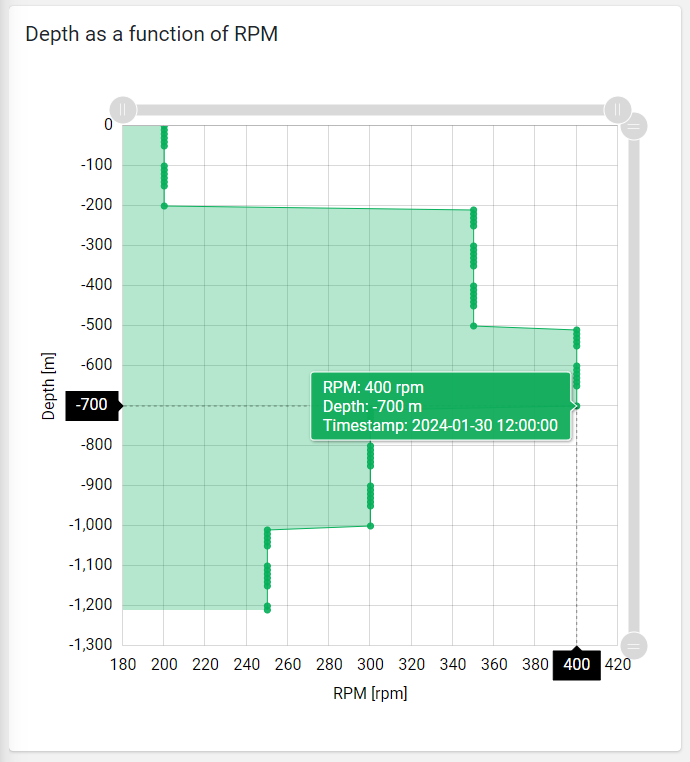
The widget, by default, uses the first defined metric as X values and the second one as Y values.
Additional metrics can be added, but in this case, a custom [Data Transformer](https://help.servitly.com/hc/en-us/articles/4408237212433) must be defined; this will use the additional metrics to calculate the new X and Y values. Here is an example of a Data Transformer that uses a third metric to transform the new X values.
```javascript
exports.xyDataTranformer = function () {
function XYDataTranformer() {}
XYDataTranformer.prototype.transform = function (data, args) {
// console.log(data);
// console.log(args);
for (let i in data) {
data[i].rpm = data[i].rpm * data[i].ratio;
}
return data;
};
return XYDataTranformer;
}();
```
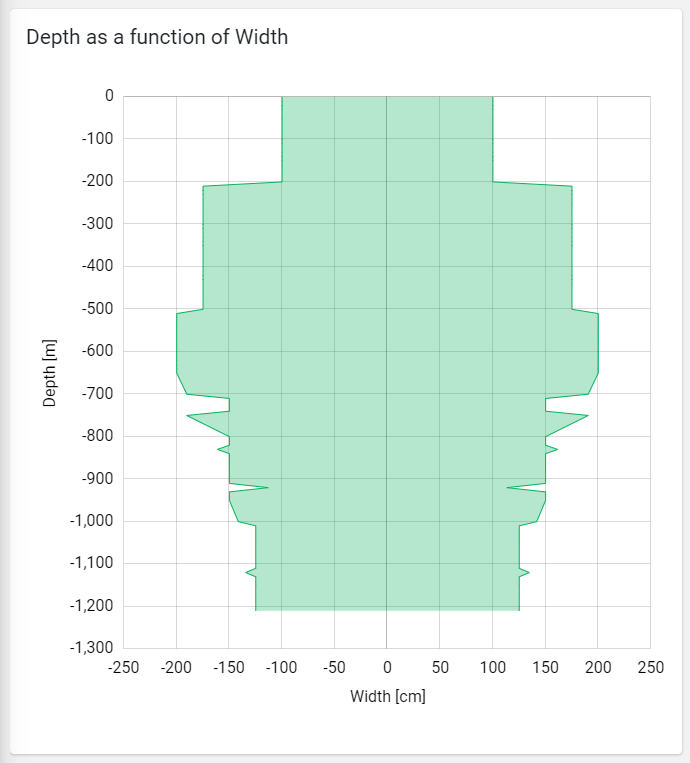
You can also display a stream chart by defining on the X or Y metrics the *Paired Data Field,* which can be the name of another metric or the name of the data field generated by the custom data transformer *(e.g., width2)*.
## Constant Lines
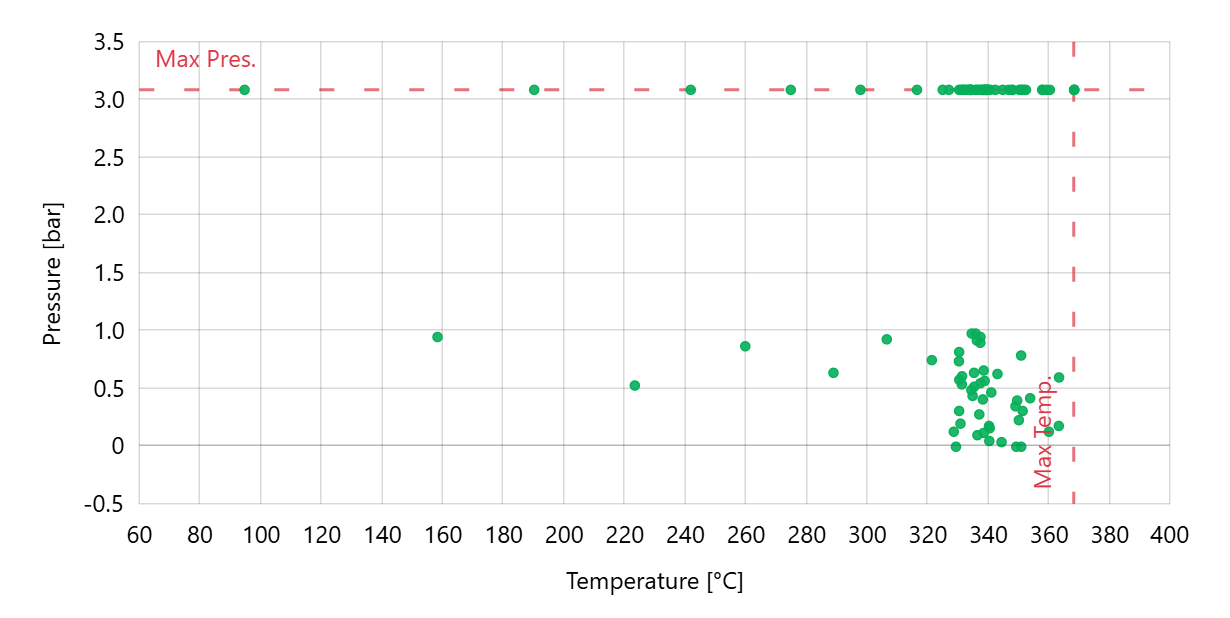
A constant line is a line marker that extends over the chart at a fixed X or Y value, giving the user information about, for instance, the minimum/maximum or median value.
On the chart, you can add one or more Constant Lines, which are described by:
- *Label*: The text displayed on the chart near the line.
- *Color*: The color of the line.
- *Orientation*: Whether the line should be on the X-axis or the Y-axis.
- *Value*: The fixed value (also used as a fallback).
- *Property*: The thing property to be used as a constant value.
- *Metrics*: The metric whose value (also aggregated) must be used as a constant value.
## Template Syntax
Below you can find some examples of how to use the component within a template.
```xml
```
## Component Reference
Here is a comprehensive list of all the elements and properties that can be used to configure the component.
#### XY Chart `<xy-chart-widget>`
| *Title* | The title displayed on the top part of the widget box. **Name**: title **Type**: STRING \| Optional `[title]="'XY Chart'"` |
| --- | --- |
| **Controls** |
| *Export Enabled* | The boolean flag indicating whether the data export is enabled. **Name**: config.exportEnabled **Type**: BOOLEAN \| Optional **Default Value**: *false* `[config]="{exportEnabled: true}"` |
| *Export File Type* | The export file type **Name**: config.exportFileType **Type**: ENUM \| Optional **Values**: *json*, *csv*, *xlsx* **Default Value**: *csv* `[config]="{exportFileType: 'json'}"` |
| *Period Filter Enabled* | The boolean flag indicating whether the embedded period filter is available. **Name**: config.filterEnabled **Type**: BOOLEAN \| Optional **Default Value**: *false* `[config]="{filterEnabled: true}"` |
| *Scrollbar Enabled* | The flag enabling the widget top scrollbar allowing the user to scroll and zoom data. **Name**: config.scrollbarEnabled **Type**: BOOLEAN \| Optional **Default Value**: *false* `[config]="{scrollbarEnabled: true}"` |
| **Data** |
| *Data Transformer* | **Name**: config.dataTransformer **Type**: FILTER \| Optional `[config]="{dataTransformer: 'dateFormat'}"` |
| *Default Loading Period* | The default filtering period applied when entering the page. **Name**: config.defaultPeriodValue **Type**: PERIODS \| Optional **Default Value**: *LAST_7_DAYS* `[config]="{defaultPeriodValue: 'LAST_30_DAYS'}"` |
| *Period Variable* | The id of the page's variable providing the date range filtering period, for instance the id of a . **Name**: inputs.period **Type**: STRING \| Optional `[inputs]="{period: 'period'}"` |
| **Advanced** |
| *Base Axis* | The base axis used to fill the chart area between the line and the axis itself. If not specified, only lines are displayed. **Name**: config.baseAxis **Type**: ENUM \| Optional **Values**: *X*, *Y* `[config]="{baseAxis: 'X'}"` |
| *Color* | The color used to display the bullets and lines. **Name**: config.color **Type**: STRING \| Optional **Default Value**: *#08B05B* `[config]="{color: '#007BFF'}"` |
| *Fill Opacity* | The opacity (0 to 1) used to fill the chart area. **Name**: config.fillOpacity **Type**: STRING \| Optional **Default Value**: *0.3* `[config]="{fillOpacity: 'abc'}"` |
| *Line Width* | Define the XY line width in pixels **Name**: config.lineWidth **Type**: INTEGER \| Optional **Default Value**: *1* `[config]="{lineWidth: 123}"` |
| *Move Points Enabled* | The flag enabling point dragging to change the X values (WRITE_METRIC_VALUES permission required). **Name**: config.movePointsEnabled **Type**: BOOLEAN \| Optional **Default Value**: *false* `[config]="{movePointsEnabled: true}"` |
| *Show Bullets* | Indicates whether to display data point bullets. **Name**: config.showBullets **Type**: BOOLEAN \| Optional **Default Value**: *true* `[config]="{showBullets: false}"` |
| *Show Lines* | Indicates whether to display lines between data point. **Name**: config.showLines **Type**: BOOLEAN \| Optional **Default Value**: *false* `[config]="{showLines: true}"` |
| *Show Timestamps* | Indicates whether to display data point matching pair timestamps. **Name**: config.showTimestamps **Type**: BOOLEAN \| Optional **Default Value**: *false* `[config]="{showTimestamps: true}"` |
| *Smoothed Line* | The flag enabling smoothed line. **Name**: config.smoothedLine **Type**: BOOLEAN \| Optional **Default Value**: *false* `[config]="{smoothedLine: true}"` |
| *X-Axis Centered on Zero* | Force the x-axis so that it is symmetrical with respect to zero **Name**: config.xAxisCentered **Type**: BOOLEAN \| Optional **Default Value**: *false* `[config]="{xAxisCentered: true}"` |
| *Y-Axis Centered on Zero* | Force the y-axis so that it is symmetrical with respect to zero **Name**: config.yAxisCentered **Type**: BOOLEAN \| Optional **Default Value**: *false* `[config]="{yAxisCentered: true}"` |
| **Rendering** |
| *Availability* | Configure availability based on active features on Digital Plan on Add-ons **Name**: hasFeature **Type**: FEATURE (multiple) \| Optional `[hasFeature]="['feature_a', 'feature_b']"` |
| *Collapse / Expand* | The flag indicating whether the widget is collaspible. **Name**: collapsible **Type**: BOOLEAN \| Optional **Default Value**: *false* `[collapsible]="true"` |
| *CSS Class* | The name(s) of the CSS class used to customize the widget layout. **Name**: class **Type**: STRING \| Optional `class="my-custom-class"` |
| *Height* | The widget desired height (default 480px). **Name**: config.height **Type**: STRING \| Optional `[config]="{height: '250px'}"` |
| *Min Width* | The minimum width of the widget (e.g. 640px). **Name**: config.minWidth **Type**: STRING \| Optional `[config]="{minWidth: '640px'}"` |
| *Visibility Condition* | The expression that allows you to reduce the visibility of the element. **Name**: *ngIf **Type**: STRING \| Optional `*ngIf="getUser().organizationId != null"` |
| **Sub Elements** |
| [*Metric*](/docs/xy-chart-widget/#metric) | The X-axis (first) or Y-axis (second) metric whose values must be loaded by the widget. |
| [*Chart Line*](/docs/xy-chart-widget/#property) | |
#### Metric `<metric>`
| *Filter* | The name of the filter used to transform and display values. **Name**: filter **Type**: FILTER \| Optional `filter="fooBarFilter"` |
| --- | --- |
| *Label* | The metric alternative label. **Name**: label **Type**: STRING \| Optional `label="Temperature"` |
| *Name* | The metric whose value(s) must be loaded by the widget. **Name**: name **Type**: METRIC \| Required `name="Temperature"` |
| *Unit* | The unit of measurement to be displayed along the value. **Name**: unit **Type**: STRING \| Optional `unit="°C"` |
| **Advanced** |
| *Max* | The maximum measure scale value. **Name**: config.max **Type**: INTEGER \| Optional `[config]="{max: 123}"` |
| *Min* | The minimum measure scale value. **Name**: config.min **Type**: INTEGER \| Optional `[config]="{min: 123}"` |
| *Paired Field* | Indicate the name of the metric to be paired when displaying a stream chart. If you are using a Data Transformer, you can indicate the name of the additional field you are generating. **Name**: config.pairedField **Type**: STRING \| Optional `[config]="{pairedField: 'maxTemperature'}"` |
| *Visibility Condition* | The expression that allows you to reduce the visibility of the element. **Name**: *ngIf **Type**: STRING \| Optional `*ngIf="getUser().organizationId != null"` |
#### Chart Line `<property>`
| *Aggregation* | **Name**: config.aggregation **Type**: AGGREGATION \| Optional **Functions**: *MIN*, *MAX*, *AVG*, *DELTA* `[config]="{aggregation: 'DELTA'}"` |
| --- | --- |
| *Color* | **Name**: config.color **Type**: STRING \| Optional **Default Value**: *#3448DF* `[config]="{color: '#007BFF'}"` |
| *Direction* | **Name**: config.direction **Type**: ENUM \| Optional **Values**: *HORIZONTAL*, *VERTICAL* **Default Value**: *HORIZONTAL* `[config]="{direction: 'HORIZONTAL'}"` |
| *Label* | **Name**: label **Type**: STRING \| Optional `label="abc"` |
| *Label Alignment* | **Name**: config.horizontalLabelAlignment **Type**: ENUM \| Optional **Values**: *LEFT*, *RIGHT* **Default Value**: *LEFT* `[config]="{horizontalLabelAlignment: 'LEFT'}"` |
| *Value* | **Name**: config.value **Type**: INTEGER \| Optional `[config]="{value: 123}"` |
| *Value Metric* | **Name**: config.valueMetric **Type**: METRIC \| Optional `[config]="{valueMetric: 'metricName'}"` |
| *Value Property* | **Name**: config.valueProperty **Type**: PROPERTY \| Optional `[config]="{valueProperty: 'propName'}"` |
## Full Syntax Example
```xml
```