---
title: "Solid Gauge"
slug: "solid-gauge-widget"
updated: 2026-04-17T07:43:06Z
published: 2026-04-17T07:43:06Z
canonical: "learn.servitly.com/solid-gauge-widget"
---
> ## Documentation Index
> Fetch the complete documentation index at: https://learn.servitly.com/llms.txt
> Use this file to discover all available pages before exploring further.
# Solid Gauge
This widget displays partial and total metric values in a concentric donuts grap
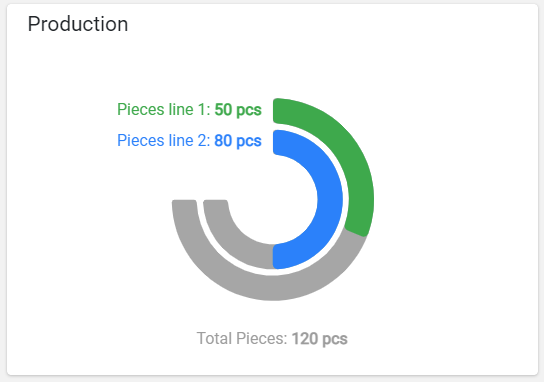
The widget requires the definition of at least two metrics, the last of which is always used as a total, while the previous ones are used as partials. For each partial metric, a colored strip is displayed with a length as a percentage of the total value. In case there are only two metrics (one partial and one total), the percentage can also be displayed in the middle of the diagram.
## Template Syntax
Below you can find some examples of how to use the component within a template.
```xml
```
## Component Reference
Here is a comprehensive list of all the elements and properties that can be used to configure the component.
#### Solid Gauge `<solid-gauge-widget>`
| *Show Percentage* | The flag indicating whether to display the percentage respect to the total value. **Name**: config.showPercentage **Type**: BOOLEAN \| Optional **Default Value**: *true* `[config]="{showPercentage: false}"` |
| --- | --- |
| *Title* | The title displayed on the top part of the widget box. **Name**: title **Type**: STRING \| Optional `[title]="'Solid Gauge'"` |
| *Total Color* | The color used for the total label and the stripe background. **Name**: config.totalColor **Type**: STRING \| Optional **Default Value**: *#9C9C9C* `[config]="{totalColor: '#AABBCC'}"` |
| *Unit* | The default unit of measurement if missing for the metric. **Name**: config.unit **Type**: STRING \| Optional `[config]="{unit: '°C'}"` |
| **Rendering** |
| *Availability* | Configure availability based on active features on Digital Plan on Add-ons **Name**: hasFeature **Type**: FEATURE (multiple) \| Optional `[hasFeature]="['feature_a', 'feature_b']"` |
| *CSS Class* | The name(s) of the CSS class used to customize the widget layout. **Name**: class **Type**: STRING \| Optional `class="my-custom-class"` |
| *Visibility Condition* | The expression that allows you to reduce the visibility of the element. **Name**: *ngIf **Type**: STRING \| Optional `*ngIf="getUser().organizationId != null"` |
| **Sub Elements** |
| [*Metric*](/docs/solid-gauge-widget/#metric) | The metric whose value must be displayed as gauge stripe. |
#### Metric `<metric>`
| *Color* | The color used for the partial label and the stripe foreground. **Name**: chartOptions.color **Type**: STRING \| Optional `[chartOptions]="{color: '#007BFF'}"` |
| --- | --- |
| *Filter* | The name of the filter used to transform and display values. **Name**: filter **Type**: FILTER \| Optional `filter="fooBarFilter"` |
| *Label* | The metric alternative label. **Name**: label **Type**: STRING \| Optional `label="Temperature"` |
| *Name* | The metric whose value(s) must be loaded by the widget. **Name**: name **Type**: METRIC \| Required `name="Temperature"` |
| *Unit* | The unit of measurement to be displayed along the value. **Name**: unit **Type**: STRING \| Optional `unit="°C"` |
| **Advanced** |
| *Visibility Condition* | The expression that allows you to reduce the visibility of the element. **Name**: *ngIf **Type**: STRING \| Optional `*ngIf="getUser().organizationId != null"` |
## Full Syntax Example
```xml
```