---
title: "Search Field"
slug: "search-field"
updated: 2026-07-29T07:50:47Z
published: 2026-07-29T07:50:47Z
canonical: "learn.servitly.com/search-field"
---
> ## Documentation Index
> Fetch the complete documentation index at: https://learn.servitly.com/llms.txt
> Use this file to discover all available pages before exploring further.
# Search Field
This page control provides a search field, which can be used as input by other page widgets.
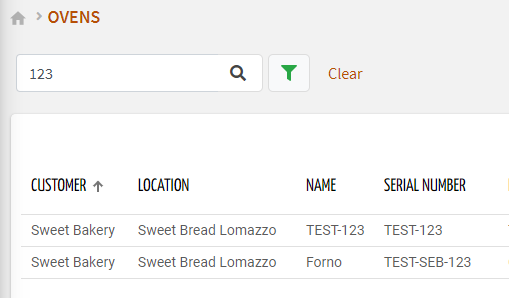
Once placed in the template, you must specify the “*Search Target*“ on which the search will work (default `THINGS`). The search field is well-suited to be placed within the [control-bar template](/v1/docs/views#control-bar-template), allowing a shared search experience across pages operating on the same search target (e.g. THINGS, EVENTS).
By default, a key text field and the button to open the advanced search are displayed. Optionally, you can change its configuration by adding the `search-input` sub-elements with these types:
- `KEY`: adds the text input for searching by text key.
- `ADVANCED`: adds the button that opens the advanced search in a pop-up.
- `PROPERTY`: adds an in-line field that searches by a specific property. The field type depends on the type of the bound property (e.g. check for Booleans, selection/radio for dictionary-based properties).
- `CLEAR`: adds the button that clears the search inputs.
You can add multiple search-input elements, and the order of them reflects how the `search-field` is displayed.
## Selection Input
In case the search target is *THINGS*, you can also add the `selection-input` sub-element, allowing the DPS user to select a subset of things (already filtered according to the other search inputs). Like a standard thing list, the columns of the selectable things list can be customized by defining the properties you want to display.
.png?sv=2026-02-06&spr=https&st=2026-10-27T14%3A54%3A15Z&se=2026-10-27T15%3A54%3A15Z&sr=c&sp=r&sig=wGPApx17XqadQPaVowSVBTRIvPm9vAOS6aomyK%2Bihf0%3D)
## Binding with other Widgets
When one of the inputs is changed by the DPS user, the new search conditions are propagated to the other page widgets listening to `search-field`. For a correct binding, the `search-field` must declare the “*id*”, and the same identifier must be set in the “*Query Variable*“ property of other page widgets.
```xml
...
...
```
According to the selected “*Search Target*”, the Search Field can be coupled with the following widgets:
- [Action List](/v1/docs/action-list-widget)
- [Active Alert List](/v1/docs/active-alert-list-widget)
- [Active Work Session List](/v1/docs/active-work-session-list-widget)
- [Bar Chart](/v1/docs/bar-chart-widget) (statistics are computed on the input objects)
- [Customer List](/v1/docs/customer-list-widget)
- [Event List](/v1/docs/event-list-widget)
- [Gauge](/v1/docs/gauge-widget) (compute an aggregated value for the input objects)
- [Historical Alert List](/v1/docs/historical-alert-list-widget)
- [Historical Work Session List](/v1/docs/historical-work-session-list-widget)
- [Location List](/v1/docs/location-list-widget)
- [Partner List](/v1/docs/partner-list-widget)
- [Thing Grid](/v1/docs/thing-grid-widget)
- [Thing List](/v1/docs/thing-list-widget)
- [Time Series Chart](/v1/docs/time-series-chart-widget#multiple-things-charting) (a series is displayed for each metric and input thing)
- [Value](/v1/docs/value-widget) (compute an aggregated value for the input objects)
### Template Syntax
Below you can find some examples of how to use the component within a template.
```xml
```
## Component Reference
Here is a comprehensive list of all the elements and properties that can be used to configure the component.
#### Search Field `<search-field>`
| *Id* | The id used by other page widgets to retrieve the query, and update the data in case the query is changed. **Name**: id **Type**: STRING \| Required `id="abc"` |
| --- | --- |
| *Label* | The field label. **Name**: label **Type**: STRING \| Optional `label="abc"` |
| *Period Filter Enabled* | The boolean flag indicating whether the embedded period filter is available. **Name**: periodFilterEnabled **Type**: BOOLEAN \| Optional **Default Value**: *true* `[periodFilterEnabled]="false"` |
| *Query* | The array of conditions filtering out items. For instance: [query]='[{'property': 'connectionStatus', 'predicate': 'eq', 'value': '1'}]' Predicates: eq, beginsWith, like, notLike, isEmpty, isNotEmpty, gt, gte, lt, lte. **Name**: query **Type**: QUERY \| Optional **Predicates**: *beginsWith*, *eq*, *neq*, *gt*, *gte*, *isEmpty*, *isNotEmpty*, *lt*, *lte*, *like*, *notLike* `[query]="[{property:'prop1', predicate: 'eq', value: 'foo'}, {property:'prop2', predicate: 'in', value: ['bar', 'baz']}]"` |
| *Search Target* | The objects to be researched. The advanced search UI depends on the selected target. **Name**: searchTarget **Type**: ENUM \| Required **Values**: *THINGS*, *LOCATIONS*, *CUSTOMERS*, *PARTNERS*, *ACTIONS*, *ACTIVE_ALERTS*, *HISTORICAL_ALERTS*, *ACTIVE_EVENTS*, *HISTORICAL_EVENTS*, *ACTIVE_WORK_SESSIONS*, *HISTORICAL_WORK_SESSIONS* **Default Value**: *THINGS* `searchTarget="THINGS"` |
| **Rendering** |
| *Availability* | Configure availability based on active features on Digital Plan on Add-ons **Name**: hasFeature **Type**: FEATURE (multiple) \| Optional `[hasFeature]="['feature_a', 'feature_b']"` |
| *CSS Class* | The name(s) of the CSS class used to customize the widget layout. **Name**: class **Type**: STRING \| Optional `class="my-custom-class"` |
| *Visibility Condition* | The expression that allows you to reduce the visibility of the element. **Name**: *ngIf **Type**: STRING \| Optional `*ngIf="getUser().organizationId != null"` |
| **Sub Elements** |
| [*Search Input*](/docs/search-field/#search-input) | The sub-element used to customize the search UI. |
| [*Selection Input*](/docs/search-field/#selection-input) | The sub-element allowing to select specific things one-to-one. |
#### Search Input `<search-input>`
| *Input Type* | The type of input to be displayed as part of the search field. **Name**: type **Type**: ENUM \| Required **Values**: *ADVANCED*, *KEY*, *PROPERTY*, *CLEAR* `type="ADVANCED"` |
| --- | --- |
| *Name* | The property for which to show the search field inline. It can only be used for input of type PROPERTY. **Name**: property **Type**: PROPERTY \| Required `property="serialNumber"` |
#### Selection Input `<selection-input>`
| **Sub Elements** |
| --- |
| [*Property*](/docs/search-field/#property) | The property to be displayed as table column in the selection dialog. |
#### Property `<property>`
| *Description* | The property description. **Name**: description **Type**: STRING \| Optional `description="abc"` |
| --- | --- |
| *Filter* | The name of the filter used to transform and display values. **Name**: filter **Type**: FILTER \| Optional `filter="fooBarFilter"` |
| *Label* | The property alternative label. **Name**: label **Type**: STRING \| Optional `label="Temperature"` |
| *Name* | The property whose value must be loaded by the widget. **Name**: name **Type**: PROPERTY \| Required `name="serialNumber"` |
| **Advanced** |
| *Column CSS Class* | The name(s) of the column CSS class used to customize the table column. **Name**: columnClass **Type**: COLUMN_CSS \| Optional `columnClass="my-column-custom-class"` |
| *Show Header* | The flag indicated whether the header is visible. **Name**: showHeader **Type**: BOOLEAN \| Optional **Default Value**: *true* `[showHeader]="false"` |
| *Visibility Condition* | The expression that allows you to reduce the visibility of the element. **Name**: *ngIf **Type**: STRING \| Optional `*ngIf="getUser().organizationId != null"` |
## Full Syntax Example
```xml
```