---
title: "Period Field V2"
slug: "period-field-v2"
updated: 2026-04-17T07:41:20Z
published: 2026-04-17T07:41:20Z
canonical: "learn.servitly.com/period-field-v2"
---
> ## Documentation Index
> Fetch the complete documentation index at: https://learn.servitly.com/llms.txt
> Use this file to discover all available pages before exploring further.
# Period Field V2
This control widget allows selecting a period to be used by other page widgets for filtering data.
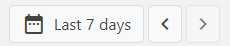
The left and right arrows allow the selected period to be moved forward and backward in time.
By clicking on the period (left button), a popup allows the user to change the period, which can be selected from predefined ones or specified manually through the calendar.
.png?sv=2026-02-06&spr=https&st=2026-10-27T12%3A32%3A20Z&se=2026-10-27T13%3A32%3A20Z&sr=c&sp=r&sig=tbVtdJRx64gq1Low108r1syti0mo2Y0ElSiss5wBrWo%3D)
Optionally, by expanding the *Specify Time* accordion, the start and end time of the day can also be selected.
.png?sv=2026-02-06&spr=https&st=2026-10-27T12%3A32%3A20Z&se=2026-10-27T13%3A32%3A20Z&sr=c&sp=r&sig=tbVtdJRx64gq1Low108r1syti0mo2Y0ElSiss5wBrWo%3D)
### Template Syntax
Below you can find some examples of how to use the component within a template.
```xml
```
## Component Reference
Here is a comprehensive list of all the elements and properties that can be used to configure the component.
#### Period Field V2 `<period-field-v2>`
| *Default Loading Period* | The initial period selected when entering the page. **Name**: defaultPeriodValue **Type**: PERIODS \| Optional `defaultPeriodValue="LAST_30_DAYS"` |
| --- | --- |
| *Enabled Periods* | The list of periods which can be selected by the user. **Name**: periods **Type**: PERIODS (multiple) \| Optional `[periods]="['TODAY', 'YESTERDAY']"` |
| *Id* | The id used by other page widgets to retrieve the selected period, and update the data in case the period is changed. **Name**: id **Type**: STRING \| Required **Default Value**: *period* `id="abc"` |
| *Label* | The field label. **Name**: label **Type**: STRING \| Optional `label="Period"` |
| **Advanced** |
| *Future Dates Selectable* | Indicates whether the user can select dates in the future. **Name**: futureDatesSelectable **Type**: BOOLEAN \| Optional **Default Value**: *true* `[futureDatesSelectable]="false"` |
| *Max Days Back* | The maximum number of past days limiting the period start date. **Name**: maxDaysBack **Type**: INTEGER \| Optional `maxDaysBack="10"` |
| *Period Selection Enabled* | Indicates whether the period selection is enabled. **Name**: periodSelectionEnabled **Type**: BOOLEAN \| Optional **Default Value**: *true* `[periodSelectionEnabled]="false"` |
| *Period Selection Style* | The style used by the user to select the period. **Name**: periodSelectionStyle **Type**: ENUM \| Optional **Values**: *TOGGLE*, *SELECTION*, *FLATTEN* **Default Value**: *FLATTEN* `periodSelectionStyle="TOGGLE"` |
| **Rendering** |
| *Availability* | Configure availability based on active features on Digital Plan on Add-ons **Name**: hasFeature **Type**: FEATURE (multiple) \| Optional `[hasFeature]="['feature_a', 'feature_b']"` |
| *CSS Class* | The name(s) of the CSS class used to customize the widget layout. **Name**: class **Type**: STRING \| Optional `class="my-custom-class"` |
| *Visibility Condition* | The expression that allows you to reduce the visibility of the element. **Name**: *ngIf **Type**: STRING \| Optional `*ngIf="getUser().organizationId != null"` |
## Full Syntax Example
```xml
```