---
title: "Bar Chart"
slug: "bar-chart-widget"
updated: 2026-10-13T13:50:35Z
published: 2026-10-13T13:50:35Z
canonical: "learn.servitly.com/bar-chart-widget"
---
> ## Documentation Index
> Fetch the complete documentation index at: https://learn.servitly.com/llms.txt
> Use this file to discover all available pages before exploring further.
# Bar Chart
Displays metric or statistic data through columns in a bar chart.
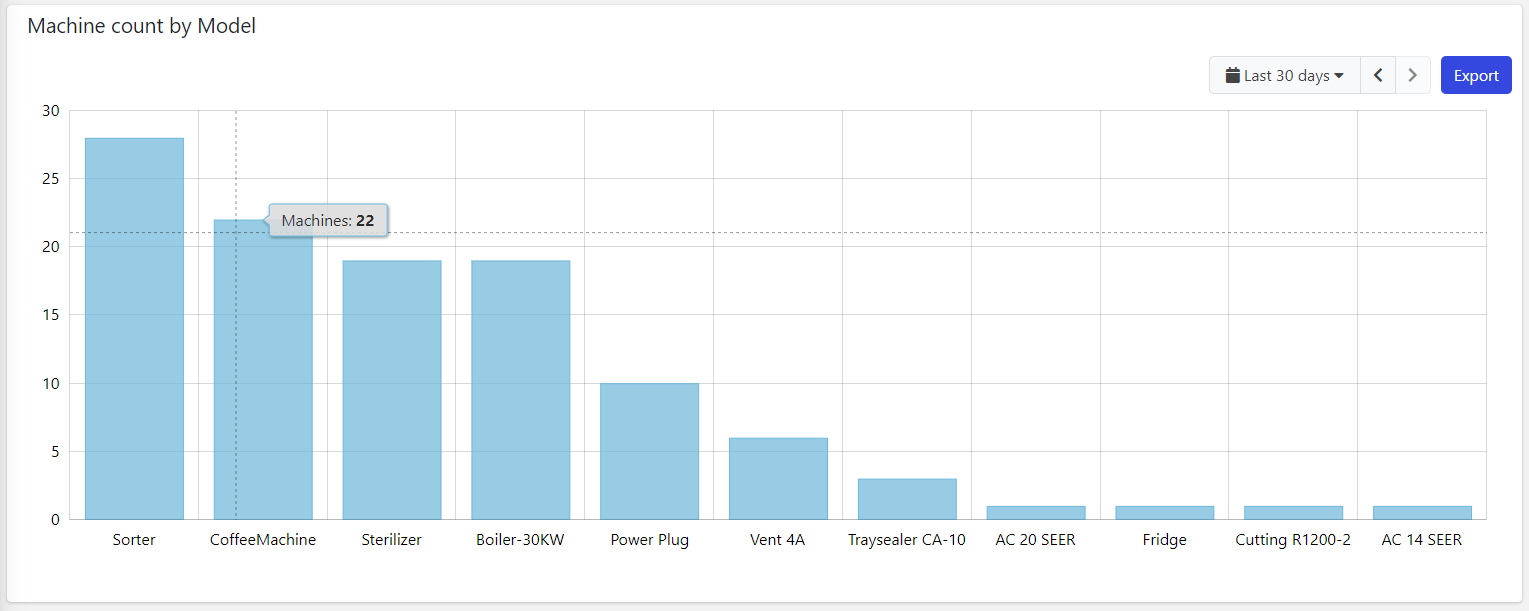
This chart uses a category-based X-axis, so you must use this widget to load aggregated data, for instance, the count of machines grouped by model name.
## Pareto Line
When displaying event statistics, for instance, the count or sum of elapsed time from each event, it is possible to display the [Pareto Line](https://en.wikipedia.org/wiki/Pareto_chart) on the bars sorted by decreasing value.
For example, the image below displays the total time spent by the machine for each fault event type. The Pareto Line enables the DPS user (e.g., technician, operations manager) to focus on the events that generate the most downtime.
.png?sv=2026-02-06&spr=https&st=2026-10-27T13%3A19%3A47Z&se=2026-10-27T14%3A19%3A47Z&sr=c&sp=r&sig=9ZUtm6YyhSNuguGREnsJv6fKgUYbqSzKm9hdQZ5X79U%3D)
In this case, the first two event types allocate 79% of the total failure time. So it will be sufficient to try to solve these two problems to increase the machine's uptime, even noticeably (80-20 rule). The other events, those after 79%, are currently less important.
To configure the Pareto Line, you must:
1. In the Statistics, select the option *Sorting* as *descending*.
2. On the Bar Chart, enable the option, *Show Pareto Line*.
## **Multiple Things Charting**
The Bar Chart can also be placed within the Location or Custom details, and display the data aggregated on the underlying objects. For instance, in a customer details page, you can display the count of failures over a period aggregated by product.
.png?sv=2026-02-06&spr=https&st=2026-10-27T13%3A19%3A47Z&se=2026-10-27T14%3A19%3A47Z&sr=c&sp=r&sig=9ZUtm6YyhSNuguGREnsJv6fKgUYbqSzKm9hdQZ5X79U%3D)
Optionally, you can change the set of things the chart is working on by coupling it with a [Search Field](/v1/docs/search-field) available on the same page.
## Template Syntax
Below you can find some examples of how to use the component within a template.
```xml
```
## Component Reference
Here is a comprehensive list of all the elements and properties that can be used to configure the component.
#### Bar Chart `<bar-chart-widget-v2>`
| *Show Pareto Line* | Compute the cumulative total and display it through a line overlaid on the columns. **Name**: config.showParetoLine **Type**: BOOLEAN \| Optional **Default Value**: *false* `[config]="{showParetoLine: true}"` |
| --- | --- |
| *Title* | The title displayed on the top part of the widget box. **Name**: title **Type**: STRING \| Optional `[title]="'Bar Chart'"` |
| **Controls** |
| *Enabled Periods* | The list of periods which can be selected from the embedded period filter. **Name**: config.enabledPeriods **Type**: PERIODS (multiple) \| Optional `[config]="{enabledPeriods: ['TODAY', 'YESTERDAY']}"` |
| *Export Enabled* | The boolean flag indicating whether the data export is enabled. **Name**: config.exportEnabled **Type**: BOOLEAN \| Optional **Default Value**: *true* `[config]="{exportEnabled: false}"` |
| *Period Filter Enabled* | The boolean flag indicating whether the embedded period filter is available. **Name**: config.filterEnabled **Type**: BOOLEAN \| Optional **Default Value**: *true* `[config]="{filterEnabled: false}"` |
| **Labels** |
| *Category Name Max Length* | The maximum length used to truncate category names. **Name**: config.categoryNameMaxLength **Type**: INTEGER \| Optional **Default Value**: *25* `[config]="{categoryNameMaxLength: 123}"` |
| *Empty Message* | The blank message to be displayed in the widget in case no item was found. To manage translations, you can define a label and use the key as the value of the property. **Name**: config.emptyMessage **Type**: STRING \| Optional `[config]="{emptyMessage: 'No customer found'}"` |
| *Show Category Labels* | Show category under each single bar. **Name**: config.showBarCategories **Type**: BOOLEAN \| Optional **Default Value**: *true* `[config]="{showBarCategories: false}"` |
| *X-Axis Label* | The label to be displayed under the X-axis. **Name**: config.xAxisLabel **Type**: STRING \| Optional `[config]="{xAxisLabel: 'Alerts by type'}"` |
| *Y-Axis Label* | The label to be displayed on the left of the Y-axis. **Name**: config.yAxisLabel **Type**: STRING \| Optional `[config]="{yAxisLabel: 'Count'}"` |
| **Data** |
| *Default Loading Period* | The default filtering period applied when entering the page. **Name**: config.defaultPeriod **Type**: PERIODS \| Optional **Default Value**: *LAST_7_DAYS* `[config]="{defaultPeriod: 'LAST_30_DAYS'}"` |
| *Period Variable* | The id of the page's variable providing the date range filtering period, for instance the id of a . **Name**: inputs.period **Type**: STRING \| Optional `[inputs]="{period: 'period'}"` |
| *Query Variable* | The id of the page's used for searching. **Name**: inputs.query **Type**: STRING \| Optional `[inputs]="{query: 'query-1'}"` |
| **Advanced** |
| *Mode* | The mode used to display the chart. WIDE: Controls, axis and grid are displayed. MICRO: Just bars are displayed ina small box. **Name**: config.mode **Type**: ENUM \| Optional **Values**: *WIDE*, *MICRO* **Default Value**: *WIDE* `[config]="{mode: 'WIDE'}"` |
| *Show Bars Horizontally* | The flag indicating whether to display the bars horizontally. **Name**: config.rotate **Type**: BOOLEAN \| Optional **Default Value**: *false* `[config]="{rotate: true}"` |
| **Rendering** |
| *Availability* | Configure availability based on active features on Digital Plan on Add-ons **Name**: hasFeature **Type**: FEATURE (multiple) \| Optional `[hasFeature]="['feature_a', 'feature_b']"` |
| *Collapse / Expand* | The flag indicating whether the widget is collaspible. **Name**: collapsible **Type**: BOOLEAN \| Optional **Default Value**: *false* `[collapsible]="true"` |
| *CSS Class* | The name(s) of the CSS class used to customize the widget layout. **Name**: class **Type**: STRING \| Optional `class="my-custom-class"` |
| *Height* | The height of the widget (e.g. 250px). **Name**: config.height **Type**: STRING \| Optional `[config]="{height: '250px'}"` |
| *Visibility Condition* | The expression that allows you to reduce the visibility of the element. **Name**: *ngIf **Type**: STRING \| Optional `*ngIf="getUser().organizationId != null"` |
| *Width* | The width of the widget (e.g. 500px). **Name**: config.width **Type**: STRING \| Optional `[config]="{width: '500px'}"` |
| **Sub Elements** |
| [*Statistic*](/docs/bar-chart-widget/#statistic) | The statistic whose values must be rendered as chart columns. |
| [*Metric*](/docs/bar-chart-widget/#metric) | The metric whose values must be aggregated and rendered as chart columns. |
| [*Aggregated Value*](/docs/bar-chart-widget/#property) | The aggregated value to be displayed over the Bar Chart. |
#### Statistic `<statistic>`
| *Aggregation* | The function used to aggregate data. **Name**: aggregation **Type**: ENUM \| Optional **Values**: *AVG*, *COUNT*, *MAX*, *MIN*, *SUM*, *LAST* `aggregation="AVG"` |
| --- | --- |
| *Averaged By* | The count used to average the statistic results (e.g. Average alert count by thing). **Name**: averagedBy **Type**: ENUM \| Optional **Values**: *thingCount* `averagedBy="thingCount"` |
| *~~Category Order~~* | The order used to display categories by value in the chart. **Name**: config.categoryOrder **Type**: ENUM \| Optional **Values**: *ASC*, *DESC* > [!CAUTION] > DEPRECATED > > Use the Sorting property. `[config]="{categoryOrder: 'ASC'}"` |
| *Color* | The color used to render columns. **Name**: config.color **Type**: STRING \| Optional `[config]="{color: '#007BFF'}"` |
| *Group By* | The property used to group results. For instance: customer.country. In the case where the underlying objects are temporally distributed you can also aggregate by HOUR, DAY, MONTH and YEAR. **Name**: groupBy **Type**: GROUP_BY \| Optional `groupBy="customer.name"` |
| *Include Empty Intervals* | True weather to include empty intervals when using interval count. **Name**: config.includeEmptyGroups **Type**: BOOLEAN \| Optional **Default Value**: *false* `[config]="{includeEmptyGroups: true}"` |
| *Interval Count* | The number of intervals to subdivide results when grouping by a property with min and max values. **Name**: config.intervalCount **Type**: INTEGER \| Optional `[config]="{intervalCount: 123}"` |
| *Label* | The alternative label displayed by the widget. **Name**: label **Type**: STRING \| Optional `label="Temperature"` |
| *Property* | The object property whose values must be aggregated. **Name**: property **Type**: PROPERTY \| Optional `property="propName"` |
| *Resource* | The resource from which to retrieve the items to be used to calculate the statistic. **Name**: resource **Type**: ENUM \| Required **Values**: *ACTION*, *ALERT*, *EVENT*, *CUSTOMER*, *LOCATION*, *PARTNER*, *THING*, *USER*, *WORK_SESSION* **Default Value**: `resource="ACTION"` |
| *Sorting* | The sort direction used to order categories by value (default none). **Name**: sortDirection **Type**: ENUM \| Optional **Values**: *ASC*, *DESC* `sortDirection="ASC"` |
| *Status* | Define whether to include events/alerts that are still active, or have been activated in a period. **Name**: activationType **Type**: ENUM \| Optional **Values**: *ACTIVE*, *ACTIVATED* `activationType="ACTIVE"` |
| *Unit* | The unit of measurement to be displayed along the value. **Name**: config.unit **Type**: STRING \| Optional `[config]="{unit: '°C'}"` |
| *Value Filter* | The name of the filter used to transform and display values. **Name**: filter **Type**: FILTER \| Optional `filter="fooBarFilter"` |
| **Data** |
| *Max Result Count* | The number of maximum returned results (default all results are returned). **Name**: limit **Type**: INTEGER \| Optional `limit="123"` |
| *Query* | The array of conditions filtering out items. For instance: [query]='[{'property': 'connectionStatus', 'predicate': 'eq', 'value': '1'}]' Predicates: eq, beginsWith, like, notLike, isEmpty, isNotEmpty, gt, gte, lt, lte. **Name**: query **Type**: QUERY \| Optional **Predicates**: *beginsWith*, *eq*, *neq*, *gt*, *gte*, *isEmpty*, *isNotEmpty*, *lt*, *lte*, *like*, *notLike* `[query]="[{property:'prop1', predicate: 'eq', value: 'foo'}, {property:'prop2', predicate: 'in', value: ['bar', 'baz']}]"` |
#### Metric `<metric>`
| *Aggregation* | The aggregation applied on the metric values. **Name**: config.aggregation **Type**: ENUM \| Optional **Values**: *AVG*, *DELTA*, *MAX*, *MIN*, *SUM* **Default Value**: *AVG* `[config]="{aggregation: 'AVG'}"` |
| --- | --- |
| *Category Order* | The order used to display categories by value in the chart. **Name**: config.categoryOrder **Type**: ENUM \| Optional **Values**: *ASC*, *DESC* `[config]="{categoryOrder: 'ASC'}"` |
| *Color* | The color used to render columns. **Name**: config.color **Type**: STRING \| Optional `[config]="{color: '#007BFF'}"` |
| *Group By* | The group by applied on the metric values. **Name**: config.groupBy **Type**: ENUM \| Optional **Values**: *DAY_OF_MONTH*, *HOUR_OF_DAY* `[config]="{groupBy: 'DAY_OF_MONTH'}"` |
| *Label* | The alternative label displayed by the widget. **Name**: label **Type**: STRING \| Optional `label="Temperature"` |
| *Name* | The metric whose value(s) must be loaded by the widget. **Name**: name **Type**: METRIC \| Required `name="Temperature"` |
| *Unit* | The unit of measurement to be displayed along the value. **Name**: unit **Type**: STRING \| Optional `unit="°C"` |
| *Value Filter* | The name of the filter used to transform and display values. **Name**: filter **Type**: FILTER \| Optional `filter="fooBarFilter"` |
#### Aggregated Value `<property>`
| *Aggregation* | The aggregation type. **Name**: config.aggregation **Type**: ENUM \| Optional **Values**: *AVG*, *MAX*, *MIN*, *SUM* **Default Value**: *SUM* `[config]="{aggregation: 'AVG'}"` |
| --- | --- |
| *Filter* | The name of the filter used to transform and display values. **Name**: filter **Type**: FILTER \| Optional `filter="fooBarFilter"` |
| *Label* | The label displayed for the aggregated value. **Name**: label **Type**: STRING \| Optional `label="Temperature"` |
| *Unit* | The unit of measurement to be displayed along the value. **Name**: config.unit **Type**: STRING \| Optional `[config]="{unit: '°C'}"` |
## Full Syntax Example
```xml
```