---
title: "Activate Thing"
slug: "activate-thing-widget"
updated: 2026-06-29T10:43:20Z
published: 2026-06-29T10:43:20Z
canonical: "learn.servitly.com/activate-thing-widget"
---
> ## Documentation Index
> Fetch the complete documentation index at: https://learn.servitly.com/llms.txt
> Use this file to discover all available pages before exploring further.
# Activate Thing
Activates a pre-registered product by entering the serial number.
Within a page, this widget is rendered as a button, which the user can click to activate a new product.
When clicked, the page changes into a wizard that asks the user to provide the serial number of the product being activated.
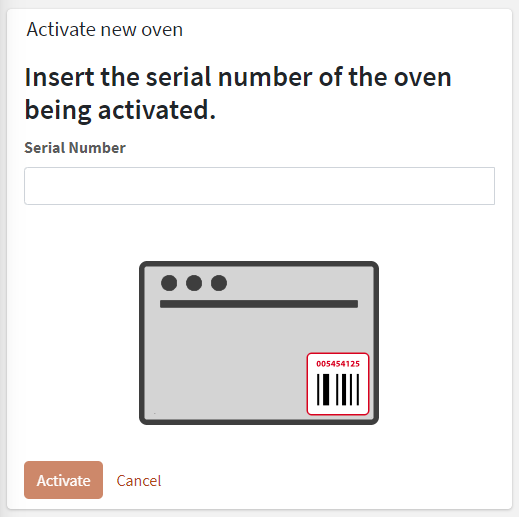
Optionally, a [Connection Token](/v1/docs/connection-tokens) may be asked for, but this depends on how you have pre-registered the products. For more details, refer to the [Products Lifecycle](/docs/dps-products-lifecycle) article.
This widget must be placed into the location details template, or optionally into the overview template of the customer; in the last case, the user also has to select a location, if more than one is present, where to activate the new product.
When the activation completes, the user is redirected to the new product dashboard.
## Template Syntax
Below you can find some examples of how to use the component within a template.
```xml
```
## Component Reference
Here is a comprehensive list of all the elements and properties that can be used to configure the component.
#### Activate Thing `<activate-thing-widget>`
| **Rendering** |
| --- |
| *Availability* | Configure availability based on active features on Digital Plan on Add-ons **Name**: hasFeature **Type**: FEATURE (multiple) \| Optional `[hasFeature]="['feature_a', 'feature_b']"` |
| *CSS Class* | The name(s) of the CSS class used to customize the widget layout. **Name**: class **Type**: STRING \| Optional `class="my-custom-class"` |
| *Visibility Condition* | The expression that allows you to reduce the visibility of the element. **Name**: *ngIf **Type**: STRING \| Optional `*ngIf="getUser().organizationId != null"` |
| **Advanced** |
| *Scanned serial transformer* | Filter used to extract the serial number from the scanned value. **Name**: serialNumberScannedValueTransformer **Type**: FILTER \| Optional `serialNumberScannedValueTransformer="dateFormat"` |
| *Scanned token transformer* | Filter used to extract the connection token from the scanned value. **Name**: connectionTokenScannedValueTransformer **Type**: FILTER \| Optional `connectionTokenScannedValueTransformer="dateFormat"` |
## Full Syntax Example
```xml
```